
- What Is Agentic Browsing and Why Does It Matter?
- What Does Lighthouse Check in Agentic Browsing?
- 1. Accessibility Tree Is Well-Formed
- 2. Cumulative Layout Shift (CLS)
- 3. WebMCP Integration
- 4. llms.txt
- How to Run the Agentic Browsing Audit on Your Website
- Method 1: Chrome DevTools (Easiest)
- Method 2: Command Line (For CI/CD)
- Method 3: PageSpeed Insights
- Prioritization: What Should You Fix First?
- Priority 1: Fix the Accessibility Tree (High Impact — Do It Now)
- Priority 2: Optimize CLS (High Impact — Data Already Available)
- Priority 3: Create llms.txt (Medium Impact — Quick and Cheap)
- Priority 4: Monitor WebMCP (Future Impact — Not Urgent)
- Key Takeaways
- Conclusion
In this article, we will break down every audit Lighthouse runs, how to test your site today, and exactly what you need to fix to avoid being left behind in the agentic web era.
What Is Agentic Browsing and Why Does It Matter?
Historically, Lighthouse measured two audiences: real users and search engine crawlers. But in 2026, a third visitor has arrived: the AI agent, tools like Gemini in Chrome, ChatGPT, Claude, and autonomous shopping assistants that can open web pages, read content, click buttons, fill out forms, and even complete transactions on behalf of humans.
The Agentic Browsing audit exists to measure that exact capability. It checks whether an AI agent can understand your page structure, locate the correct elements, and perform actions on your website. Crucially, this category does not affect your PageSpeed Insights 0-100 score. It is a separate section showing pass/fail results for each individual audit.
What Does Lighthouse Check in Agentic Browsing?
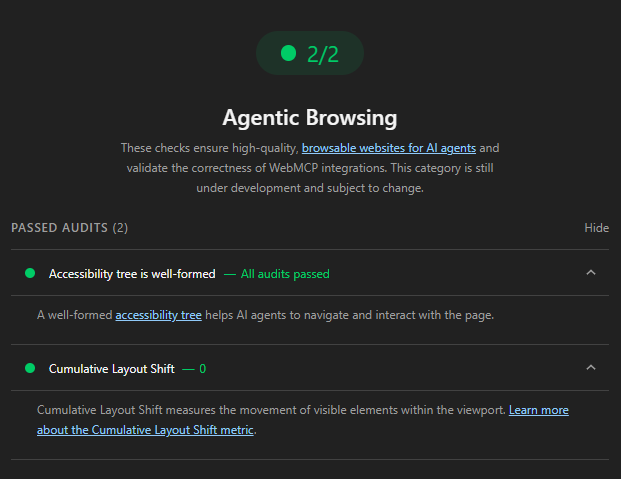
Currently, this category runs 9 audits grouped into 4 main areas. Below is a detailed breakdown of each criterion and how to fix failures.
1. Accessibility Tree Is Well-Formed
This is the most important audit and also where most websites fail. AI agents do not “see” web pages like humans do. Instead, they read the accessibility tree, a machine-readable structure map built by the browser from your HTML, ARIA attributes, and semantic markup.
Lighthouse filters for specific accessibility errors that directly impact machine interaction:
- Interactive elements missing accessible names or labels (buttons, links, and form fields without an
aria-labelor descriptive text). - Invalid ARIA usage (for example, placing
aria-expandedandaria-haspopupon a plain input without arole="combobox"). - Broken parent-child relationships within the accessibility tree.
- Content hidden from the accessibility tree when it should be interactive.
How to fix it:
- Use proper semantic HTML:
<button>for actions,<a>for links,<nav>for menus. - Ensure every interactive element has a programmatic name using
aria-label,aria-labelledby, or visible text inside the element. - Audit your ARIA with tools like axe DevTools or the Accessibility panel in Chrome DevTools.
- Follow WCAG 2.1 guidelines. This work helps AI agents, screen-reader users, and your SEO simultaneously.
2. Cumulative Layout Shift (CLS)
CLS measures how much visible elements move around the viewport while the page loads. Why does this matter to an AI agent?
Many agents operate by taking a screenshot, analyzing the position of a button or form, and then clicking those coordinates. If the layout shifts between the moment the agent “sees” the element and the moment it “clicks” (an ad banner pushes a button down, a late-loading font causes text to jump, or an image without dimensions shifts content), the agent will click empty space or the wrong element, causing the entire task to fail.
How to fix it:
- Always declare
widthandheighton images and videos. - Reserve space (placeholders) for ads, embeds, or dynamically injected content.
- Avoid inserting new content above existing content, especially within the initial viewport.
- Use
font-display: swapcarefully. Preload critical fonts to minimize text flicker. - Monitor real-user CLS data in Google Search Console (Core Web Vitals) rather than relying solely on lab test scores.
3. WebMCP Integration
WebMCP (Web Model Context Protocol) is an experimental protocol that allows websites to register “tools” AI agents can call directly. Instead of an agent guessing “this button adds to cart,” WebMCP lets you declare explicitly: this is an addToCart() action requiring productId and quantity parameters.
Lighthouse checks three aspects:
- Registered WebMCP tools: Lists all tools registered on the page.
- Missing declarative WebMCP on forms: Whether forms lack WebMCP annotations.
- WebMCP schema validity: Whether the tool schema is structurally valid.
You can register tools in two ways:
a) Declarative API (HTML annotation):
<form toolname="book_appointment" tooldescription="Book a doctor appointment">
  <input type="date" name="date" required>
  <input type="time" name="time" required>
  <button type="submit">Book Now</button>
</form>
b) Imperative API (JavaScript):
navigator.modelContext.registerTool({
  name: "search_products",
  description: "Search the store inventory",
  parameters: {
    query: { type: "string", description: "Search keyword" }
  },
  handler: async (params) => {
    // Handle search logic
  }
});
Important note: WebMCP currently only works in Chrome when the chrome://flags/#enable-webmcp-testing flag is enabled, or in Chrome Canary. Most websites will receive a “Not Applicable” result for these audits today. This is a forward-looking feature. You do not need to rush implementation, but you should monitor its evolution closely.
4. llms.txt
llms.txt is a Markdown file placed at the root of your domain (for example, yoursite.com/llms.txt) that provides a concise summary of your website for AI consumption. It is conceptually similar to robots.txt, but designed to help agents quickly understand your site’s purpose and structure.
Lighthouse verifies:
- Whether
llms.txtexists at the domain root. - Whether the file contains at least one H1 heading.
- Whether the content is long enough to be useful (excessively short files trigger a warning).
- Whether the file contains at least one link to an internal page.
Example llms.txt structure:
# Company Name / Website

A brief introduction to the website, its industry, and core value proposition.

## Important Pages

- [Home](https://yoursite.com/)
- [Products](https://yoursite.com/products/)
- [Contact](https://yoursite.com/contact/)
- [Blog](https://yoursite.com/blog/)

## Contact Information

Email: [email protected]
Phone: +1 (555) 123-4567
Note: The Google Search team has confirmed that llms.txt does not affect search rankings or AI Overviews. However, creating this file is fast (about 30 minutes), low-risk, and may prove useful as more agents browse the web through Chrome in the future. If you do not have one, the audit will show “Not Applicable” rather than “Fail.”
How to Run the Agentic Browsing Audit on Your Website
Method 1: Chrome DevTools (Easiest)
- Open Chrome version 150 or later (or Chrome Canary if running an older release).
- Navigate to the page you want to test.
- Open DevTools (F12) and switch to the Lighthouse tab.
- Check the Agentic Browsing category (it may be selected by default).
- Click Analyze page load and wait for the results.
Tip: Run the audit in Incognito Mode with all browser extensions disabled to avoid skewed results.
Method 2: Command Line (For CI/CD)
Install the Lighthouse CLI:
npm install -g lighthouse@latestRun the Agentic Browsing audit in isolation:
lighthouse https://yoursite.com/ \
  --only-categories=agentic-browsing \
  --chrome-flags="--enable-experimental-web-platform-features" \
  --output=html \
  --output-path=report.html
Then open report.html to review detailed pass/fail results.
Method 3: PageSpeed Insights
As of July 2026, PageSpeed Insights does not yet display the Agentic Browsing category. Use Chrome DevTools or the Lighthouse CLI for full results.
Prioritization: What Should You Fix First?
Not every audit demands immediate action. Here is a practical priority order based on real-world impact:
Priority 1: Fix the Accessibility Tree (High Impact — Do It Now)
This delivers the biggest dual benefit. Cleaning up semantic HTML and ARIA does not just help you pass the Agentic Browsing audit; it also improves the experience for visually impaired users, strengthens search engine crawlability, and reinforces on-page SEO. If your site already has solid accessibility, you are nearly done with this section.
Priority 2: Optimize CLS (High Impact — Data Already Available)
You already have CLS data from Lighthouse Performance reports and Search Console. Focus on high-interaction pages: product pages, checkout carts, signup forms, and booking flows. Ensure that critical elements do not shift after the initial paint.
Priority 3: Create llms.txt (Medium Impact — Quick and Cheap)
This takes about 30 minutes to write and upload to your domain root. No complex code changes required. It is a low-risk investment that keeps your site ready if this standard becomes widely adopted.
Priority 4: Monitor WebMCP (Future Impact — Not Urgent)
The protocol is still experimental, support is limited, and no major commercial agent relies on it yet. Read the documentation, experiment on a staging environment, but do not let it block higher-priority work like performance and accessibility improvements.
Key Takeaways
- Agentic Browsing is not a ranking factor. Google has not stated this affects search rankings. Treat it as a future-readiness signal rather than an urgent mandate.
- There is no 0-100 score. You will see pass/fail ratios (for example, 3 out of 4 passed) rather than a single aggregated number. Google wants to provide actionable signals, not rankings.
- The category is experimental. Google explicitly states it is “still under development and subject to change.” Audits and criteria may shift in future Lighthouse releases.
- “Not Applicable” is not “Fail.” If you do not have an
llms.txtfile or have not implemented WebMCP, the result will be Not Applicable, not a penalty.
Conclusion
Agentic Browsing in Lighthouse is a meaningful inflection point: for the first time, Google has released a standardized set of criteria to evaluate websites from an AI agent’s perspective. Although still experimental, it makes clear that the web is shifting from “optimized for humans and search bots” to “optimized for autonomous AI agents as well.”
The good news is that most of the work required, semantic HTML, valid ARIA, and layout stability, is work you should already be doing regardless of this audit. Start by running Lighthouse on your two most important pages (homepage and primary conversion page), note any accessibility tree and CLS failures, and schedule fixes this week. A website ready for AI agents is not just preparation for the future. It is a better experience for every human visitor today.









Comments