- What Makes Init Read Different?
- Zero Dependencies
- Modern Dark Theme Design
- Automatic Language Detection
- Automatic and Accurate Table of Contents
- Auto-Updates When Content Changes
- Key Features of Init Read
- How to Install Init Read
- Method 1: Auto-Inject (Simplest)
- Method 2: Custom Container
- Method 3: With Custom Configuration
- Complete Init Read Configuration Table
- How to Customize Languages
- How to Integrate Init Read with WordPress
- Method 1: Add to Theme File
- Method 2: Using Insert Headers and Footers Plugin
- Method 3: Using functions.php
- Method 4: Using Code Snippets Plugin
- Init Read JavaScript API
- Frequently Asked Questions
- Is Init Read free?
- Does Init Read slow down my website?
- Does Init Read work on Safari?
- How do I change the widget colors?
- Does the widget support H4 headings?
- Conclusion
Looking for a way to add a reading progress bar and table of contents to your website without bloated plugins? Init Read is the solution for you. Developed by Init HTML, this standalone JavaScript library displays reading progress as an SVG circle with an auto-generated table of contents dropdown. Just embed a single file, no UI framework required.
What Makes Init Read Different?
The market offers many reading progress plugins and libraries, but most come with significant limitations. Some require bulky WordPress plugins, while others depend on frameworks like Bootstrap or UIkit, making integration unnecessarily complex. Init Read was built to solve these exact problems.
Zero Dependencies
Init Read is written entirely in vanilla JavaScript. No jQuery, no React, no Vue, no Bootstrap, no UIkit. The JavaScript file is only about 25KB, and CSS is automatically injected into the page when the widget initializes. You can use Init Read on any website, from personal WordPress blogs to large news portals, without worrying about conflicts with existing libraries.
Modern Dark Theme Design
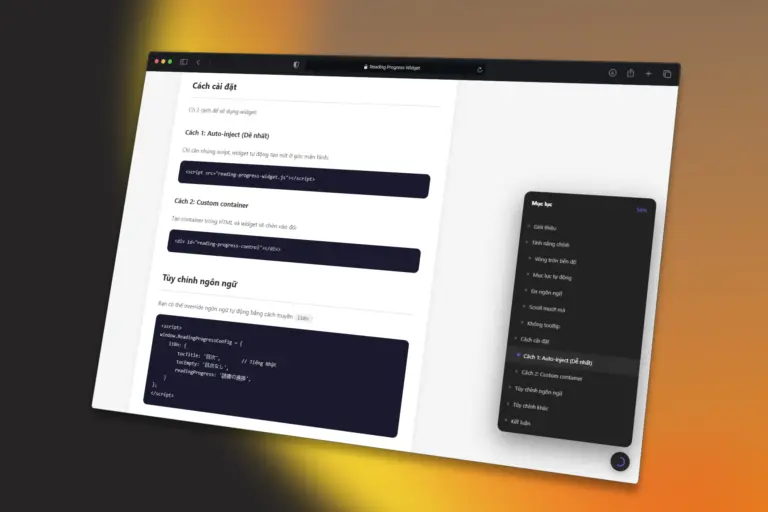
Init Read features a dark theme with glassmorphism effects, smooth rounded corners, and fluid animations. The circular trigger button stands out on any page background, while the table of contents dropdown uses backdrop-filter blur for a premium, professional feel. The widget automatically adjusts position and size on mobile devices to ensure the best user experience.
Automatic Language Detection
One of Init Read’s standout features is its ability to automatically detect language from the lang attribute of the html tag. If your page has <html lang="vi">, the widget displays Vietnamese. For <html lang="en">, it switches to English. You can also override the language by passing an i18n object in the configuration, allowing support for any language you need.
Automatic and Accurate Table of Contents
Init Read automatically scans H2 and H3 heading tags within your article content and generates a hierarchical table of contents. If a heading lacks an ID, the widget automatically creates a unique ID based on the text content. When you click an item in the dropdown, the page smoothly scrolls to the corresponding heading. The widget also tracks the current scroll position to highlight the section being read.
Auto-Updates When Content Changes
If your website uses lazy loading, infinite scroll, or AJAX to load additional content, Init Read continues to work accurately thanks to MutationObserver. The widget monitors DOM changes and automatically updates the heading list and reading progress.
Key Features of Init Read
- SVG circular progress indicator with customizable colors and sizes
- Automatic table of contents from H2, H3 headings with hierarchical indentation
- Smooth scroll to heading when clicking a table of contents item
- Active section highlighting based on scroll position
- Automatic language detection from
html lang(English and Vietnamese) - Custom language override via config
- Dark theme with glassmorphism, no cluttered tooltips
- Fully responsive on all devices with automatic position adjustment
- MutationObserver for automatic updates when DOM changes
- Keyboard support (Escape to close dropdown)
- Full ARIA labels for accessibility
- Zero dependencies, ~25KB file size
- Auto-injected CSS, no additional stylesheet needed
How to Install Init Read
There are two ways to install Init Read on your website. The simplest is auto-inject, where the widget automatically creates a button in the corner of the screen. The second method uses a custom container if you want precise control over placement.
Method 1: Auto-Inject (Simplest)
Just add one script line at the end of your body tag or in the head:
<script src="init-read/init-read.min.js"></script>The widget will automatically create a button in the bottom-right corner with default settings.
Method 2: Custom Container
If you want to place the widget at a specific position in your layout, create a container with the ID initread-control:
<div id="initread-control"></div>
<script src="init-read/init-read.min.js"></script>
Method 3: With Custom Configuration
To customize the widget, define the window.InitReadConfig object before loading the script:
<script>
window.InitReadConfig = {
    articleSelector: 'article',
    contentSelector: '.entry-content',
    headingTags: ['h2', 'h3'],
    progressColor: '#6366f1',
    trackColor: 'rgba(128,128,128,0.18)',
    position: 'bottom-right',
    edgeOffset: 24,
    autoInject: true
};
</script>
<script src="init-read/init-read.min.js"></script>
Complete Init Read Configuration Table
| Option | Default | Description |
|---|---|---|
articleSelector | article, .article, .post-content... | Selector to find the main article element |
contentSelector | .content, .article-content... | Selector for the article content area |
headingTags | ['h2', 'h3'] | Heading tags to build the table of contents |
progressColor | #6366f1 | Color of the progress circle |
trackColor | rgba(128,128,128,0.18) | Background color of the progress circle |
circleSize | 22 | Size of the circle in pixels |
strokeWidth | 2.5 | Stroke width of the circle |
offsetTop | 80 | Offset distance when scrolling to a heading |
position | bottom-right | Widget position: bottom-right, bottom-left, top-right, top-left |
edgeOffset | 24 | Distance from screen edges in pixels |
autoInject | true | Auto-create button if container not found |
i18n | null | Custom language override object |
How to Customize Languages
Init Read automatically detects language from the lang attribute of the html tag. If lang="vi" or lang="vi-VN", the widget displays Vietnamese. All other values default to English.
To completely override or add a new language, use the i18n option:
<script>
window.InitReadConfig = {
    i18n: {
        tocTitle: 'Table of Contents',
        tocEmpty: 'No table of contents',
        readingProgress: 'Reading progress'
    }
};
</script>
<script src="init-read/init-read.min.js"></script>
How to Integrate Init Read with WordPress
To add Init Read to your WordPress website, use one of the following methods:
Method 1: Add to Theme File
Open your theme’s footer.php file and add the script before the closing </body> tag:
<script src="init-read/init-read.min.js"></script>
</body>
Method 2: Using Insert Headers and Footers Plugin
Install the Insert Headers and Footers plugin, then go to Settings > Insert Headers and Footers and paste the script into the Scripts in Footer box.
Method 3: Using functions.php
Add the following code to your theme’s functions.php file:
function enqueue_initread() {
    wp_enqueue_script('initread', 'init-read/init-read.min.js', array(), null, true);
}
add_action('wp_enqueue_scripts', 'enqueue_initread');
Method 4: Using Code Snippets Plugin
If you prefer not to edit theme files, install the Code Snippets plugin and create a new snippet with code similar to Method 3.
Init Read JavaScript API
After the widget initializes, you can access the instance through the global variable to control the widget:
// Refresh headings and progress (useful after dynamic content loads)
window.__initread_instance__.refresh();

// Destroy the widget and clean up DOM
window.__initread_instance__.destroy();

// Re-initialize the widget
window.initRead();

// Access the class to create a manual instance
const widget = new window.InitRead();
Frequently Asked Questions
Is Init Read free?
Yes, Init Read is an open-source library released under the MIT license. You can use it for free for both personal and commercial projects.
Does Init Read slow down my website?
No. The JavaScript file is only about 25KB, optimized and minified. CSS is auto-injected, so no additional HTTP requests are needed. The widget uses requestAnimationFrame for the scroll handler to ensure smooth performance.
Does Init Read work on Safari?
Yes, Init Read supports all modern browsers including Chrome, Firefox, Safari, and Edge. The widget uses standard web APIs such as SVG, MutationObserver, and requestAnimationFrame.
How do I change the widget colors?
You can change the progress circle color using the progressColor option in the config. For example, progressColor: '#ff6b6b' will change it to coral red.
Does the widget support H4 headings?
Yes, just add 'h4' to the headingTags array in the config: headingTags: ['h2', 'h3', 'h4'].
Conclusion
Init Read is the ideal solution if you’re looking for a lightweight, beautiful, and easy-to-use reading progress widget. With its framework-independent design, automatic language detection, and modern dark theme interface, Init Read will enhance the reading experience on your website without adding complexity to your project.
Visit Init HTML to explore more web tools and resources. If you have any questions or feedback, feel free to leave a comment below.










Comments