
- Init Quote Studio – A Professional Tool for Creating Beautiful Quote Images
- Flexible Quote Input
- Diverse Font Selection
- 7 Predefined Display Templates
- Image Ratio and Visual Style Customization
- Avatar and Background Image Options
- Adjustable Background Overlay and Quote Box Opacity
- One-Click PNG Export
- Smooth WEBM Lyric Video Export
- Auto-Save and Restore
- Powerful Keyboard Shortcuts
- Full-Screen Studio Mode
- Runs Entirely in Your Browser – No App Needed
- Start Creating with Init Quote Studio Today
Init Quote Studio – A Professional Tool for Creating Beautiful Quote Images
Init Quote Studio is a powerful, modern quote image generator that runs entirely in your browser. Easily input your quote, choose fonts, customize background and avatar, pick a display style, and export high-quality images (PNG) or lyric videos (WEBM).
Flexible Quote Input
The intuitive interface allows you to enter the main quote, speaker’s name, and an optional subline. You can also toggle options like bold, italic, verified tick, and dark quote box to enhance the design.
Diverse Font Selection
Over 30 curated fonts are organized into categories:
- Clean / Modern: Roboto, Inter, Open Sans…
- Retro / Typewriter: Special Elite, Courier Prime…
- Handwriting: Pacifico, Great Vibes…
- Elegant: Playfair Display, Lora…
- Impact / Headline: Bebas Neue, Anton…
All fonts are loaded from Google Fonts and rendered instantly after selection.
7 Predefined Display Templates
You can choose from various display templates, including:
- Classic
- Facebook-style
- Poster layout
- Music-share layout
- Quote card
- Caption style
- Minimalist
Each template has its own layout, alignment, image usage, and text rendering style to suit different purposes.
Image Ratio and Visual Style Customization
Init Quote Studio supports popular aspect ratios like 1:1, 16:9, 9:16, 4:5, and 3:4 – perfect for social media, blogs, or printing. Users can also select visual effects for the quote box: Neon, Glassmorphism, Torn Paper, Terminal, or Bold Outline.
Avatar and Background Image Options
You can:
- Upload images from your device or paste an image URL
- Use random images from built-in Pexels galleries
The system automatically crops and fits the images, ensuring clean, professional results every time.
Adjustable Background Overlay and Quote Box Opacity
Use sliders to control the background overlay transparency and the opacity of the quote box, improving readability on busy backgrounds.
One-Click PNG Export
Once your quote design is complete, just click “Download PNG” to save a high-resolution image to your device – ready to share or print.
Smooth WEBM Lyric Video Export
With the “Music-share” template, you can:
- Enter timed lyrics (e.g.,
4|First line of lyrics) - Set video duration (up to 60 seconds)
- Choose frame rate: 30fps or 60fps
- Export WEBM video with smooth text transitions, rotating disc avatar, timestamp, and progress bar – like a real music player.
Auto-Save and Restore
All form data is automatically saved in your browser. When you return, everything is restored – no risk of losing your creative work.
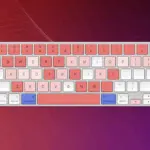
Powerful Keyboard Shortcuts
Init Quote Studio supports handy keyboard shortcuts to speed up your workflow:
- Ctrl + B: Toggle bold
- Ctrl + I: Toggle italic
- Alt + R: Random background
- Alt + A: Random avatar
- Ctrl + Alt + S: Download PNG
- Ctrl + → / ←: Switch template
- Ctrl + K: Show shortcut list
Full-Screen Studio Mode
Enable full-screen mode to enter a distraction-free creative environment. The screen splits between form input and live canvas preview, offering a clean, focused workspace.
Runs Entirely in Your Browser – No App Needed
No installation. No login. Init Quote Studio works entirely in your browser, compatible with Chrome, Firefox, Edge, and Safari. All rendering is done via HTML5 Canvas – no AI, no server-side processing.
Start Creating with Init Quote Studio Today
If you’re looking for a fast, flexible, and creative way to design beautiful quote graphics, Init Quote Studio is the tool for you. Whether you’re a content creator, teacher, writer, or simply want to capture inspiring words – this tool will elevate your quote creation game.







Comments