
- Installing InitOps
- Reopening the Tool Menu
- Version Info
- Installation Process
- After Deployment
- System Requirements
- What Does InitOps Install?
- Automatic Performance Tuning
- Kernel & TCP Stack Tuning
- Intelligent Swap Management
- Redis Object Cache Integration
- System Cron Replacing WP-Cron
- Multi-Site on One VPS
- Defense-in-Depth Security
- Server Monitoring via Discord
- Automatic SSL Renewal via Cloudflare DNS
- Choose PHP 8.3, 8.4, or 8.5 During Deployment
- PHP Version Manager — Zero-Downtime Switching
- Comparison: Manual Setup vs. InitOps
- Conclusion
- Quick Install Command
A single command automatically installs Nginx, MariaDB, PHP 8.3/8.4/8.5, Redis, an Iptables Firewall, Fail2Ban, Certbot SSL tooling, WordPress, and applies performance-optimized configurations matched to your VPS hardware.
Official repository: github.com/brokensmile2103/initops.
Installing InitOps
Log in to your Ubuntu VPS as root:
ssh root@your-server-ipThen run the single install command:
curl -sSL https://inithtml.com/initops/install.sh | bashOr:
curl -fsSL https://raw.githubusercontent.com/brokensmile2103/initops/main/install.sh | bashWithin a few minutes of fully automated setup, your high-performance environment will be ready to serve your project.
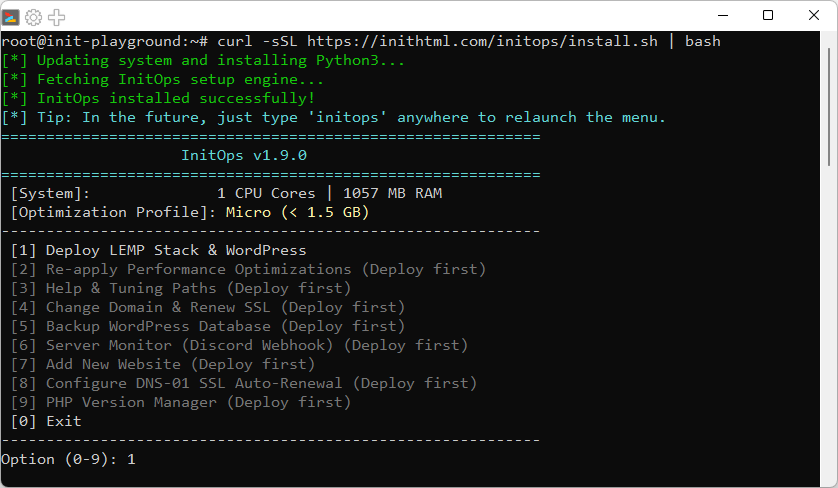
Reopening the Tool Menu
After the initial installation, InitOps integrates directly into the system as a System Command. Whenever you need to reopen the configuration menu, check system info, or re-apply optimizations, simply type:
initopsBuilt-in menu options:
- Re-apply Performance Optimizations — Re-tune the entire stack after a VPS upgrade, with automatic PHP 8.3/8.4/8.5 detection.
- Change Domain & Renew SSL — Change your domain and automatically issue a new SSL certificate, with Nginx validation before applying.
- Backup WordPress Database — Back up databases for all sites on the server (multi-site aware, supports bulk or per-site selection).
- Add New Website — Deploy an additional WordPress site on the same VPS, each with its own database and Redis DB. Choose your own web root folder name.
- Server Monitor (Discord) — Real-time monitoring of Disk, RAM, CPU, and MySQL with Discord Webhook alerts. Supports English — Vietnamese bilingual interface.
- Configure DNS-01 SSL Auto-Renewal (Cloudflare) — Set up automatic SSL renewal via Cloudflare DNS challenge. No port 80 required.
- PHP Version Manager — Install additional or switch between PHP 8.3/8.4/8.5 post-deployment with zero downtime and instant rollback capability.
- Help & Tuning Paths — Quickly view the locations of all system configuration files.
Version Info
- Version: 1.9.0
- Updated: 2026-07-03
Installation Process
- Choose PHP: Select PHP 8.3 (stable), PHP 8.4 (stable, recommended), or PHP 8.5 (latest) during deployment.
- Domain: Enter your domain name (or press Enter to use your Public IP).
- Database name: The name for your WordPress database.
- Table prefix: The table prefix (changing from the default improves security).
The database user and password are automatically generated using a cryptographic library for maximum security.
After Deployment
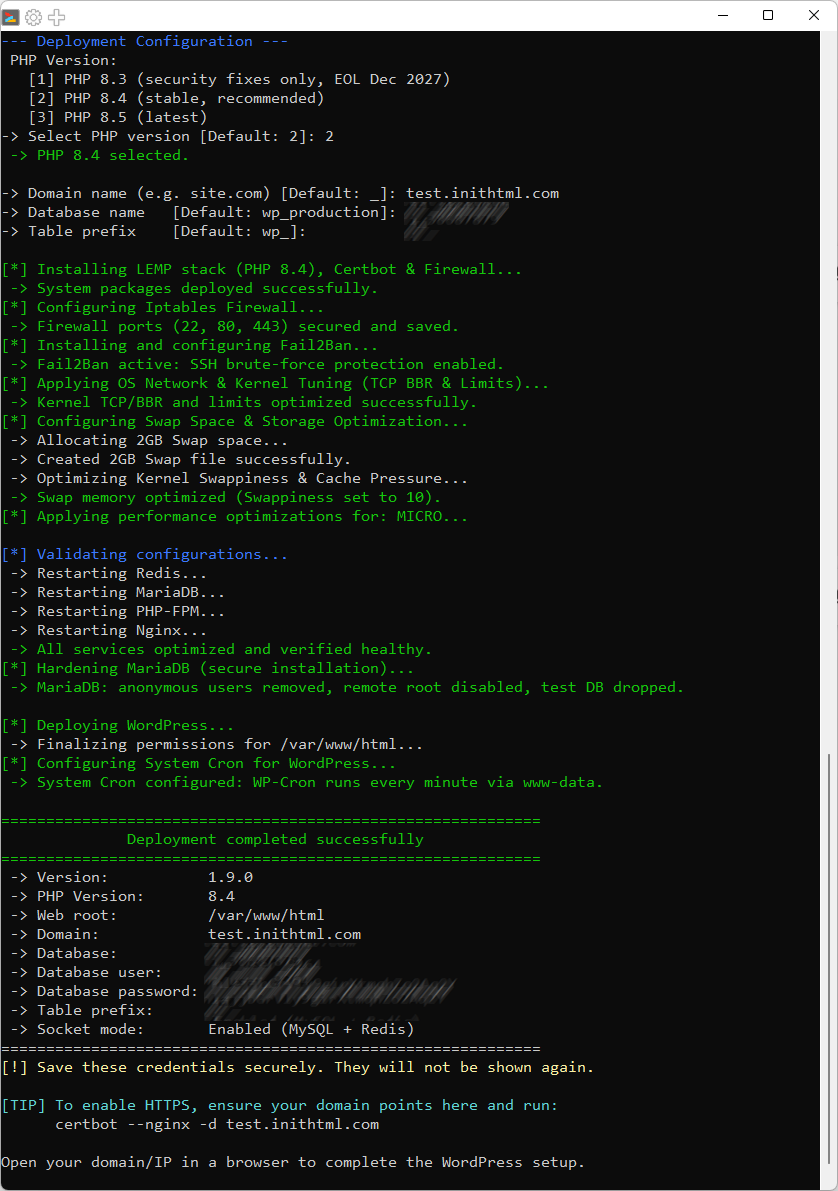
The screen displays full deployment details:
- Selected PHP Version (8.3, 8.4, or 8.5).
- Database Name, User, Password, and Prefix.
- Web root path (
/var/www/html). - SSL activation command:
certbot --nginx -d domain.com.
Note: Save your database credentials carefully — they will not be displayed again for security reasons.
System Requirements
- Ubuntu Server 24.04 LTS.
- Logged in as Root.
- A completely clean VPS/Dedicated Server (Fresh OS install).
- Stable internet connection.
What Does InitOps Install?
- Nginx — High-throughput web server.
- MariaDB — Secure, high-performance database server with automated hardening (removes anonymous users, test DB, and disables remote root access).
- PHP 8.3/8.4/8.5 FPM — Maximum WordPress processing performance. Choose your version during deployment, with post-deployment switching supported.
- Redis Server — Ultra-fast object cache over Unix Socket.
- Fail2Ban — Automatically blocks SSH brute-force attacks.
- WordPress Core — Latest release from WordPress.org.
- Certbot — Free SSL certificate issuance from Let’s Encrypt.
- Iptables & Iptables-Persistent — Firewall with automatically saved rules.
- PHP Extensions — redis, imagick, mbstring, gd, curl, zip, bcmath, opcache…
- PHP Version Manager — Manage and switch PHP versions without downtime.
Automatic Performance Tuning
InitOps automatically detects CPU cores and RAM to apply one of 6 distinct optimization profiles: Micro, Small, Standard, Medium, Large, XLarge. Each profile tunes the entire stack in sync — Nginx (workers, buffers, file cache), PHP-FPM (process manager sized from actual remaining RAM), MariaDB (InnoDB buffer pool ~45% of RAM), and Redis (memory limit, LRU eviction).
OPcache auto-tuned by profile: Since v1.9.0, InitOps automatically configures OPcache shared memory, max accelerated files, and interned strings buffer according to the hardware profile — preventing cache overflow and recompile storms on heavy themes and plugins.
Note: The system automatically detects your running PHP version when you select Re-apply Performance Optimizations — no manual edits needed.
Kernel & TCP Stack Tuning
InitOps automatically applies a comprehensive kernel tuning set to maximize network throughput, stabilize connections, and accelerate response times:
- TCP BBR — Enables the BBR congestion control algorithm instead of Cubic, significantly reducing latency and improving page load speed.
- File Limits — Raises
fs.file-maxto 2,000,000 andfs.inotify.max_user_watchesto 524,288, ensuring Nginx + PHP-FPM are not descriptor-bound under high traffic. - Connection Backlog — Pushes
net.core.somaxconn,tcp_max_syn_backlog, andnetdev_max_backlogto 65,535, combined withtcp_syncookies = 1to mitigate SYN flood / light DDoS spikes. - Socket Lifecycle — Enables
tcp_tw_reuse, lowerstcp_fin_timeoutto 15s, fine-tunes keepalive probes (600s / 30s / 5 attempts), and expandsip_local_port_rangeto 1024–65000 for efficient port reuse. - Redis Background Save — Sets
vm.overcommit_memory = 1to prevent OOM failures when Redis performs BGSAVE on memory-constrained VPS.
All configurations are written to /etc/sysctl.d/99-initops-kernel.conf and applied immediately via sysctl --system — no reboot required.
Intelligent Swap Management
InitOps does not create swap rigidly for every profile; instead, it allocates dynamically based on actual RAM capacity:
- Micro & Small (< 3.5 GB RAM): Allocates a 2 GB swap file to prevent crashes when RAM is exhausted.
- Standard (3.5 – 6 GB): Allocates a 1 GB swap file as a light safety net while preserving disk space.
- Medium and above (≥ 6 GB): No swap created — prioritizes keeping the entire workload in physical RAM.
If the system already has an active swap (partition or file), InitOps auto-detects and skips to avoid conflicts. The swap file is persisted via /etc/fstab with chmod 600 permissions.
Alongside swap, InitOps tunes two additional critical kernel parameters:
vm.swappiness = 10— Forces the kernel to prioritize RAM usage, only swapping when RAM is critically low (< 10%).vm.vfs_cache_pressure = 50— Keeps inode/dentry cache in RAM longer, accelerating Nginx and log rotation I/O.
Redis Object Cache Integration
Redis communicates with PHP over a Unix Socket (/var/run/redis/redis.sock) instead of TCP, completely eliminating network overhead. Each website uses a dedicated Redis database (DB 0 for the first site, DB 1+ for additional sites), preventing cache collisions between sites.
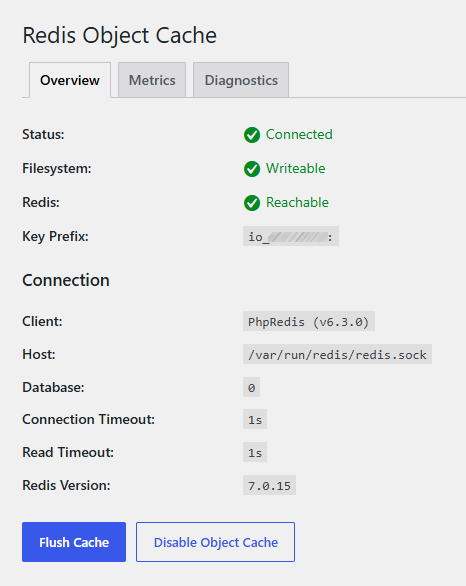
After deployment, simply install the Redis Object Cache plugin and activate it — the system automatically detects the socket configuration.
System Cron Replacing WP-Cron
- Disables the built-in WP-Cron (
DISABLE_WP_CRON = true). - Sets up a System Cron that runs every minute via WP-CLI under the
www-datauser. - Uses
flock -nto prevent overlapping processes.
Multi-Site on One VPS
Since v1.5.0, InitOps supports deploying multiple independent WordPress sites on the same VPS:
- Each site has its own database, Redis DB, and Nginx vhost.
- Choose your own web root folder name when adding a new site.
- Database backup supports backing up all sites at once or selecting individual sites.
- Does not affect the primary site at
/var/www/html.
Defense-in-Depth Security
- Firewall: Only ports 22, 80, and 443 are open. Fail2Ban bans IPs after 5 failed SSH login attempts.
- Anonymization:
expose_php = Off,server_tokens off. - Directory Protection: Blocks PHP execution in
/uploads/, and blocks direct access towp-config.php,.git, and.htaccess. - Basic DDoS Mitigation:
xmlrpc.phpdisabled by default. - File Permissions: Directories 755, files 644,
wp-config.php640.
Server Monitoring via Discord
The integrated Server Monitor sends real-time alerts to a Discord Webhook:
- Continuously monitors Disk, RAM, CPU, and MySQL.
- 🔴 Alert when a threshold is exceeded, 🟢 notification when recovered.
- Spam prevention: each alert is sent only once until recovery.
- Supports bilingual English — Vietnamese for both the UI and alert content.
- Check frequency automatically adjusted based on VPS tier (every 5–10 minutes).
Default alert thresholds: Disk >85% | RAM >90% | CPU >90% per core | MySQL unresponsive.
Automatic SSL Renewal via Cloudflare DNS
Since v1.6.0, InitOps supports migrating cert renewal to DNS-01 Challenge via Cloudflare — no port 80 required, no webroot dependency, works even when Nginx is offline:
- Automatically installs the
python3-certbot-dns-cloudflareplugin. - Stores your API Token in
/root/.secrets/cloudflare.iniwithchmod 600permissions. - Patches the existing renewal config in-place — no cert re-issuance needed, zero downtime.
- Creates a deploy hook to automatically reload Nginx after each successful renewal.
- Enables and verifies
certbot.timer(runs twice daily). - Runs a
--dry-rundirectly from the menu to validate the configuration before going live.
Minimum API Token permissions: Zone → DNS → Edit | Zone → Zone → Read — scope to your specific zone only, never “All zones”.
Choose PHP 8.3, 8.4, or 8.5 During Deployment
InitOps v1.9.0 allows you to select your PHP version right from the initial deployment step:
- PHP 8.3 — Stable, receives security fixes only (EOL Dec 2027).
- PHP 8.4 — Stable, recommended, with improved JIT performance. Active support until Dec 2028.
- PHP 8.5 — Latest release with bleeding-edge features. Active support until Dec 2029.
After deployment, the system automatically detects your running PHP version when you select Re-apply Performance Optimizations — no manual edits needed.
PHP Version Manager — Zero-Downtime Switching
New in InitOps v1.9.0, the PHP Version Manager lets you manage and switch PHP versions after deployment without reinstalling the entire stack:
- Install additional PHP: Install multiple PHP branches (8.3, 8.4, 8.5) side-by-side on the same server — new versions are installed but not activated, consuming no RAM until switched.
- Zero-downtime switch: Starts the new PHP-FPM alongside the old one, updates fastcgi_pass across all vhosts, validates Nginx, then stops the old FPM — your site never goes down.
- Instant rollback: Old packages remain installed; a single menu action switches everything back instantly.
- Auto-reapply tuning: Every switch regenerates pool config, runtime INI, and OPcache tuning based on the current hardware profile — the new version is never less optimized than the old one.
- PHP CLI sync: Automatically updates
update-alternativesso WP-CLI and cron jobs always run on the active PHP version.
Comparison: Manual Setup vs. InitOps
| Criteria | Manual | InitOps |
|---|---|---|
| Deployment time | 45–90 minutes | 3–5 minutes |
| DevOps knowledge required | High | None |
| Performance tuning per hardware | Manual calculation | 6 auto profiles |
| Firewall + Fail2Ban | Manual config | 100% automated |
| Database backups | Write scripts / manual | One menu key |
| Server monitoring (Discord) | Not included | Built-in |
| Switch PHP version post-deploy | Risk of downtime | Zero-downtime |
| Multi-site WordPress | Complex manual setup | Add via menu |
| Auto SSL (Cloudflare DNS) | Install plugin + manual cron | Menu-driven |
| Kernel tuning (BBR, limits) | Research + edit | Auto-apply |
Conclusion
InitOps v1.9.0 simplifies the entire WordPress deployment process — from stack installation, firewall configuration, Fail2Ban integration, System Cron setup, and hardware tuning, to multi-site support, real-time monitoring, automatic SSL renewal via Cloudflare DNS, and now flexible PHP 8.3/8.4/8.5 management with zero-downtime switching. A production-ready solution that requires no deep DevOps knowledge.
Quick Install Command
curl -sSL https://inithtml.com/initops/install.sh | bash









Comments