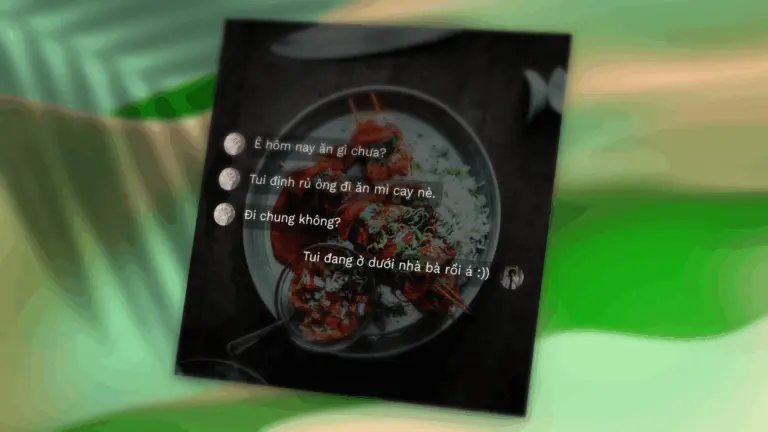
A true chat-like interface
Messenger Style automatically detects speaker roles. Just follow this structure:
[Speaker name]
[Message content]
Example:
Linh
Have you eaten today?
Linh
I’m thinking of ordering spicy noodles.
Linh
Wanna join?
Nam
I'm already outside :))
Even when the same speaker sends multiple messages in a row, just repeat their name – the system will render the correct side and sequence of chat bubbles.

Key features
- Separate left/right avatars for each speaker
- Dynamically sized message bubbles
- Vertically centered layout for better composition
- Support for dark/light message boxes and overlay backgrounds
- Font, font size, and aspect ratio customization
- Export to PNG, copy to clipboard, save/load templates
Unsupported features in this style
To maintain a clean chat layout, Messenger Style does not support the following:
- Custom speaker name (quoteAuthor)
- Subtitle under name (quoteSubline)
- Verified badge (isVerified)
These options are still fully functional in other layouts such as Facebook, Poster, or Classic.
Other features still fully supported
All core features of Init Quote Studio remain available in Messenger Style:
- 30+ fonts, all with Vietnamese support
- On-the-fly font size adjustment
- Aspect ratio presets: square, portrait, landscape, and more
- Customizable quote box styles: Neon, Glassmorphism, Terminal, etc.
- Random avatars and background selection
- Copy image to clipboard or download as PNG
Practical use cases
Messenger Style is perfect for:
- Recreating memorable conversations
- Making memes from chat messages
- Saving personal moments and quotes as shareable images
- Highlighting dialogue-based stories
How it’s different from other styles
While styles like Facebook, Classic, or Minimalist are ideal for short quotes or single statements, Messenger Style is the go-to option when telling a full story or showcasing multiple message exchanges between speakers.
Conclusion
Messenger Style brings a new dimension to personalized content creation. By blending a familiar chat interface with Init Quote Studio’s flexibility, it helps users share messages with more emotion, clarity, and context.
Try creating your own chat conversation and share it the professional way – with Init Quote Studio.







Comments