
1. What Is the Demo Feature in Init Press?
Demo Mode lets you define HTML, CSS, and JavaScript on a per-post basis. The HTML is rendered exactly where you want inside the post content, while CSS and JavaScript are automatically loaded at the page level.
This approach keeps your theme clean while giving you full freedom to build demos, previews, or playgrounds.
2. How to Enable Demo Mode
To activate the Demo feature, follow these steps:
- Go to the WordPress admin dashboard.
- Navigate to Init Press → Settings.
- Find the option labeled Post Demo Mode.
- Enable it and save your settings.

Once enabled, the Demo metabox will become available on the post edit screen.
3. The Demo Metabox in the Post Editor
When editing or creating a post, you will see a Demo metabox below the content editor. This metabox contains three separate fields:
- HTML: used to define the structure of the demo output.
- CSS: used to style the demo.
- JavaScript: used to add interactivity or client-side logic.
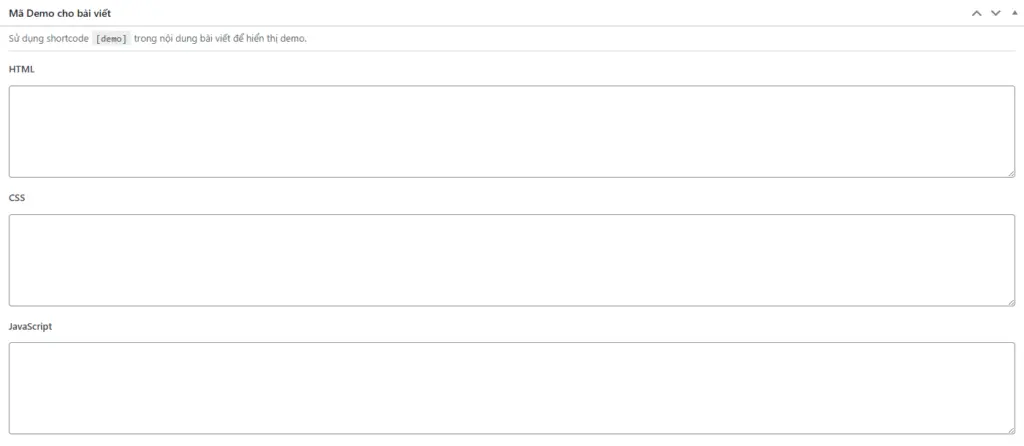
All demo code entered here applies only to the current post.
4. Displaying the Demo in Post Content
To display the demo HTML on the frontend, simply insert the following shortcode into your post content:
[demo]The shortcode outputs the HTML defined in the Demo metabox exactly at the position where it is placed.
5. How CSS and JavaScript Are Handled
CSS and JavaScript are processed independently from the shortcode. When a post contains demo CSS or JavaScript, the theme automatically handles them as follows:
- CSS is injected into the document head.
- JavaScript is injected before the closing body tag.
This ensures proper loading order and stable behavior without relying on the shortcode itself.
6. Important Notes When Using Demo Mode
Demo Mode allows raw JavaScript execution, so it should be used responsibly. It is intended for trusted authors and technical use cases such as demonstrations, tutorials, or internal testing.
Avoid using this feature for untrusted user-generated content.
7. Recommended Use Cases
The Demo feature is especially useful for:
- Programming tutorials and technical blog posts.
- UI and interaction demonstrations.
- Quick feature prototypes or experiments.
- Showcasing concepts to clients or internal teams.
Conclusion
The Demo feature in the Init Press theme provides a powerful and flexible way to present interactive content. By separating HTML, CSS, and JavaScript and keeping everything scoped to individual posts, it enables clean, maintainable, and professional demo workflows for modern content-driven websites.










Comments