
- What’s new in Init FX Engine 1.6?
- Advanced Snowfall controls: amount, size, speed, and opacity
- Balanced visuals that respect your content
- Performance-aware particle rendering
- Safe defaults and configuration protection
- Developer-friendly architecture
- Full internationalization support
- Who should upgrade to Init FX Engine 1.6?
- Conclusion: the most refined Snowfall release yet
What’s new in Init FX Engine 1.6?
Version 1.6 focuses on one key goal: making Snowfall beautiful, adjustable, and reliable. Instead of a one-size-fits-all effect, Snowfall is now configurable in detail, allowing site owners to match the intensity of the effect with their design style, audience, and seasonal needs.
Advanced Snowfall controls: amount, size, speed, and opacity
Init FX Engine 1.6 introduces four essential Snowfall parameters that give you full visual control:
- Snow amount: control how many snow particles appear on the screen, avoiding visual clutter.
- Snow size: adjust the average particle size for a more natural snowfall look.
- Fall speed: fine-tune how fast the snow falls, from calm and cozy to lively and festive.
- Opacity: balance visibility so snow enhances the page without blocking text or UI elements.
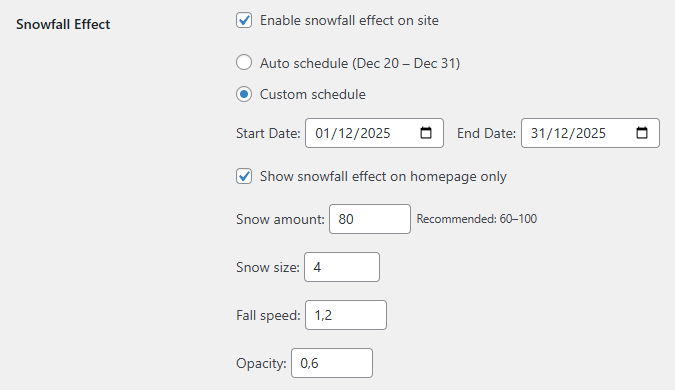
All default values are carefully tuned to work well across most themes, providing a festive feel out of the box with no extra tweaking required.
Balanced visuals that respect your content
A common problem with snowfall effects is that they look great at first but quickly become distracting. In version 1.6, Snowfall rendering is optimized to stay visually pleasing while keeping content readable and interactions clear. The result is a subtle holiday atmosphere that enhances your site rather than competing with it.
Performance-aware particle rendering
Init FX Engine 1.6 improves how particle density is handled, preventing heavy overdraw when higher snow counts are used. This ensures smoother animations, better performance on a wide range of devices, and a more consistent experience throughout the site.
Safe defaults and configuration protection
To avoid extreme or broken configurations, version 1.6 applies strict value limits and intelligent fallbacks. Even if settings are missing, outdated, or misconfigured, Snowfall will continue to run with stable, reasonable values. This makes upgrades safer and day-to-day usage more reliable.
Developer-friendly architecture
For developers, Init FX Engine 1.6 delivers a cleaner and more maintainable Snowfall system. The settings schema is normalized and backward-compatible, while only the necessary Snowfall parameters are passed to the frontend. This reduces JavaScript payload size and keeps rendering logic clearly separated from scheduling and configuration logic.
Full internationalization support
All new Snowfall settings introduced in version 1.6 are fully translatable. This ensures a consistent and user-friendly admin experience for multilingual sites and aligns Snowfall controls with the rest of the plugin’s internationalization system.
Who should upgrade to Init FX Engine 1.6?
- Websites that want a festive Snowfall effect without sacrificing readability or usability.
- Blogs, news sites, and holiday landing pages looking for subtle but effective seasonal visuals.
- Developers who value clean configuration, backward compatibility, and predictable behavior.
Conclusion: the most refined Snowfall release yet
Init FX Engine 1.6 is all about control, balance, and polish. It delivers a Snowfall effect that feels festive, smooth, and professional, making it an ideal upgrade for the holiday season. Turn it on, tune it once if needed, and enjoy a calm, beautiful winter atmosphere across your site.









Comments