Table of Contents
Why Batch Upload?
- Save hours: one ZIP = many chapters, with progress logs per folder.
- No Media Library mess: images are copied directly into
uploads/init-manga/<manga_id>/<chapter>/, no extra sizes generated. - Secure workflow: zip-slip protection, symlink blocking, system junk filter; cleanup with realpath guard to delete sandbox only.
- Admin-only: available to Administrators only, preventing misuse.
How it works
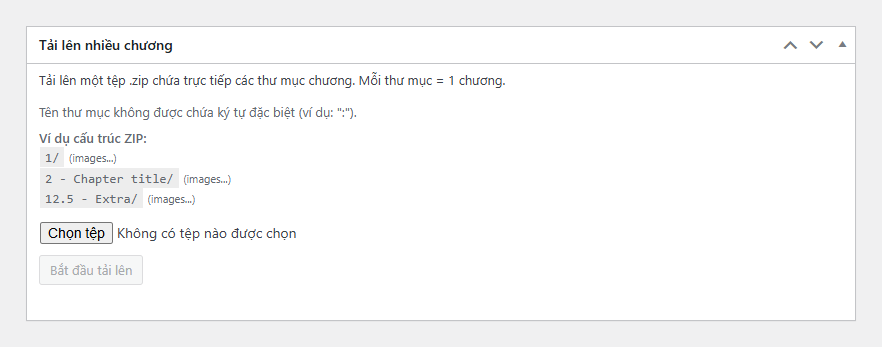
- 1 ZIP containing chapter folders directly: each folder = 1 chapter.
- Securely extracted into a temporary sandbox:
uploads/init-manga-batch/<manga_id>/zip_…/. - Chapter images are copied into the final path:
uploads/init-manga/<manga_id>/<chapter_number>/0001.png,0002.png… - Chapter content is built automatically, then the sandbox and temp ZIP are cleaned up safely.
Chapter folder naming rules
- Valid:
12or12.5 - Title(integer/decimal, optional title after-). - Forbidden: special characters
\ / : * ? " < > |(especially:is banned). - Example ZIP structure:
1/(images…)2 - Chapter title/(images…)12.5 - Extra/(images…)
Security & safeguards
- Zip-slip protection: blocks absolute paths,
../, NUL bytes; validates parent paths withrealpath()+ trailing separator. - Symlink blocking: ignores symbolic links based on external attributes.
- Junk filter: skips
__MACOSX,.DS_Store,Thumbs.db, and hidden files. - Zip-bomb defense: capped at 20k files and 5GB uncompressed size.
- Safe cleanup: deletes sandbox only; temp ZIP is removed after import.
3-step usage
- Go to the Manga edit screen (must be Published) and open the Batch Upload Chapters metabox.
- Select a
.zipfile with valid chapter folders → click Start Batch Upload. - Watch the log: each chapter shows its status and image count; done in minutes.
Practical notes
- Supported image formats:
jpg,jpeg,png,gif,webp,avif. - Slug collision: if a chapter number already exists, it will be skipped (no overwrite).
- Performance: direct copy (no resize), natural filename sorting, lightweight logging.
Quick Q&A
- Do images go into the Media Library? No. They’re copied directly into chapter folders without generating thumbnails.
- Can cleanup accidentally delete outside files? No. Cleanup uses realpath guard and only touches the sandbox.
- Can normal users see this metabox? No. It’s strictly Administrator-only.
Conclusion
With **Batch Upload (ZIP Only)**, bulk chapter uploads go from tedious to effortless. Clean, fast, secure — and under full control. Starting with **v1.5.3**, this is the standard way to import multiple chapters at once in Init Manga.










Comments