
What is Server ZIP Ingest?
Server ZIP Ingest is a new admin metabox that scans, validates, and processes .zip files placed in a per-manga ingest directory. Each ZIP contains chapter folders; every folder represents a chapter and is imported into the target manga with preserved order and metadata. The ingest runs entirely on the server for maximum reliability.
Why it matters
- Bypass upload limits: No browser uploads, no Cloudflare 100MB ceiling.
- Massive throughput: Import tens or hundreds of chapters in one run.
- Deterministic flow: Strict parsing rules ensure clean slugs and image ordering.
- Operational clarity: Real-time progress and a persistent log make results auditable.
How it works
- Place one or more
.zipfiles intowp-content/uploads/init-manga-ingest/{manga_id}/incoming/. - Open the manga in the WordPress admin and use the Ingest ZIP from Server metabox.
- Click Scan ZIPs, then choose Process Selected or Process All.
- The system safely unzips, validates folder names, orders images, builds chapter HTML, and saves chapters.
- ZIP files are moved to
archive/on success orfailed/on error for traceability.
Requirements
- WordPress admin capability to manage manga content.
- Valid Init Manga license and the manga is published.
- Writable ingest path:
wp-content/uploads/init-manga-ingest/{manga_id}/incoming/.
Quick setup
- Enable Server ZIP Ingest in Integrations settings.
- Open a published manga and locate the Ingest ZIP from Server metabox.
- Use the inline Create now button to auto-create
incoming/,archive/, andfailed/with correct permissions. - Verify the writable status displays correctly.
ZIP structure guidelines
- ZIP root must contain chapter folders only (no loose images at ZIP root).
- Folder names:
12or12.5 - Title; avoid path characters and reserved symbols. - Supported image formats: JPG, PNG, WebP, AVIF, GIF.
- Images inside each chapter folder are naturally sorted and renamed to zero-padded sequence.
Using the metabox
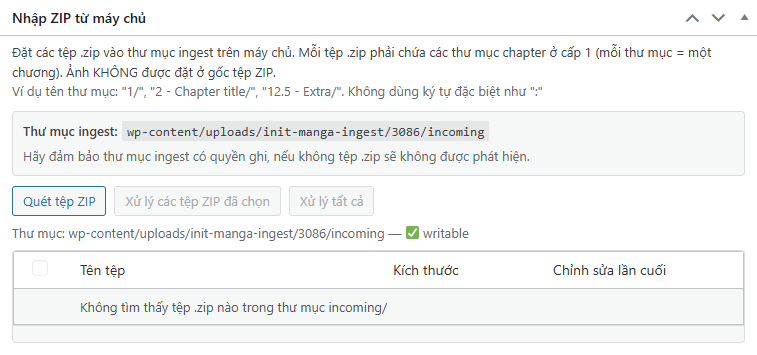
- Scan ZIPs: Lists available ZIPs with name, size, and modified time.
- Process Selected / Process All: Runs synchronous ingestion with a real-time progress bar.
- Logs: Shows chapter-level results with success and error lines, plus a summary block. Logs persist after completion and reset when you scan again or process new files.
- Automatic chapter reload: The chapter list refreshes as soon as processing finishes.
Directory permissions and the Create now button
The metabox displays the ingest path relative to wp-content/ and a “writable” status. If the directory does not exist, click Create now to automatically create all required subdirectories with correct permissions. When writable, the button hides to reduce UI noise.
Safety and validation
- Safe unzip: Blocks path traversal, absolute paths, and symlinks; enforces file count and size limits.
- Strict parsing: Validates chapter folder naming and prevents slug collisions.
- Clean storage: Images are copied into
uploads/init-manga/{manga_id}/{chapter}/without creating Media Library attachments.
Best practices
- Run ingestion on published manga to keep URL generation stable.
- Keep ZIP files focused (one series per ingest batch) for clearer logs and faster triage.
- Use consistent chapter numbering to avoid accidental collisions.
- Ensure sufficient PHP execution time and memory for very large batches.
Frequently asked questions
Does this replace browser uploads? No. It complements existing methods with a high-throughput, server-side path for bulk operations.
What happens to processed ZIP files? They are auto-moved to archive/ or failed/ for auditability.
Can I mix formats in one chapter? Yes, supported formats are normalized and ordered during ingest.
Conclusion
Server ZIP Ingest in Init Manga v1.7.2 delivers a reliable, high-volume import workflow purpose-built for production. With safe extraction, strict validation, persistent logging, and automatic chapter refresh, teams can move entire arcs in minutes—without fighting browser or CDN limits.










Comments