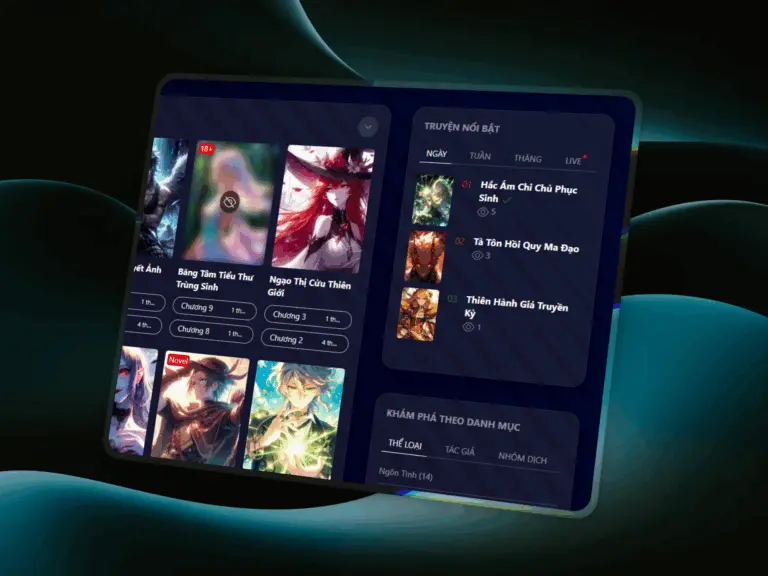
Glassmorphism Skin: modern, elegant, and focused
The new Glassmorphism Skin introduces a transparent, depth-filled interface that highlights manga covers and content beautifully on a clean, dark background. Subtle blur and translucency effects create a luxurious look without compromising performance or readability. Activate it easily via Init Manga → Appearance → Skin Style.
Auto Scroll: smooth, hands-free reading
- Optional auto-scroll mode with Play/Pause button for easy control.
- Adjustable scroll speed using “+” and “–” keys for a personalized reading rhythm.
- Persistent localStorage memory saves your preferred settings automatically.
- Smart auto-stop at the share section to encourage engagement.
- Optimized sticky navbar behavior for uninterrupted scroll flow.
Optimized UX for uninterrupted reading
Auto Scroll has been refined to prevent interruptions during navigation changes, ensuring a steady and natural scrolling motion even when toggling sticky elements. Readers can now enjoy a smoother, more cinematic reading experience.
More power for developers and creators
A new hook, init_manga_after_unlock_success, allows you to trigger custom actions after content unlock—ideal for analytics, promotions, or custom integrations at key user interaction moments.
Layout and template improvements
- New horizontal manga item layout for a richer and more visual browsing experience.
- Adjusted responsive margins for the first column in
uk-gridlayouts. - Removed unused variables to streamline performance and maintenance.
How to activate
- Enable the new skin: Go to Init Manga → Appearance → Skin Style → Glassmorphism.
- Try Auto Scroll: Open any chapter, press Play/Pause to start, and use “+” or “–” to adjust speed.
Upgrade today
Init Manga v1.7.4 combines stunning visuals with smarter usability. Install the update, switch to the Glassmorphism Skin, and give your readers the most fluid, premium manga experience yet.










Comments