Table of Contents
- Retro Skin: light, gentle, and visually appealing
- Retro Buttons: soft gradients and clear disabled states
- Light Mode lock-in for consistent Retro visuals
- Cyberpunk Skin: neon sci-fi HUD aesthetics
- Cyberpunk Buttons: glowing outlines and pulse effects
- Dark Mode lock-in for consistent Cyberpunk visuals
- How to enable these skins
- Try the new skins today
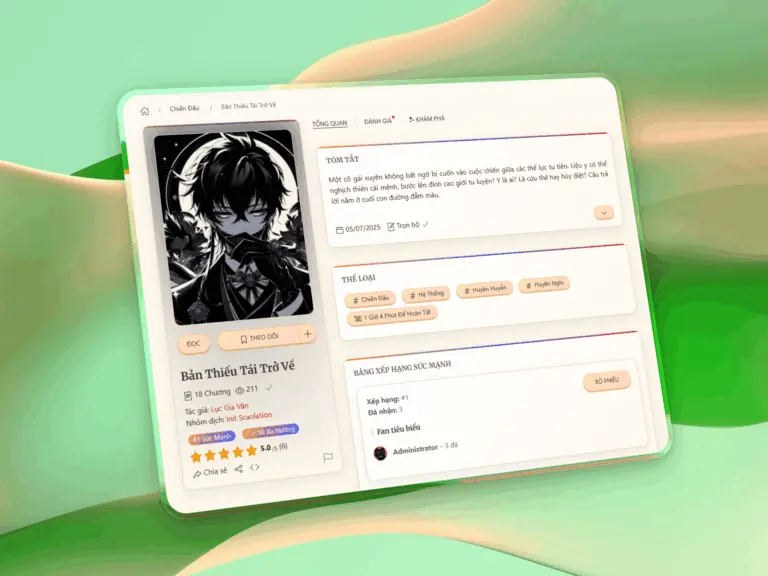
Retro Skin: light, gentle, and visually appealing
- Soft, non-glare background that makes manga covers and content stand out.
- Rounded cards with warm retro borders and subtle gradient headers.
- Clean, bright layout designed for long reading sessions without eye strain.
- Fully compatible with the theme’s UIkit-based interface structure.
Simply select Retro in Init Manga → Appearance → Skin Style and your entire site updates instantly.
Retro Buttons: soft gradients and clear disabled states
- Pill-shaped buttons with gentle retro gradients.
- A dedicated softened disabled state that keeps the UI tidy and readable.
- Special exception for genre tag filters to preserve layout integrity.
Light Mode lock-in for consistent Retro visuals
- The theme automatically switches to Light Mode when Retro is selected.
- The Dark/Light toggle is hidden to maintain a stable, unified design.
Cyberpunk Skin: neon sci-fi HUD aesthetics
- Neon HUD-inspired visuals with animated borders, scanline overlays, glow pulses, and sweeping highlights.
- Deep, atmospheric Dark Mode background to maximize neon contrast and futuristic vibes.
- Dynamic visual accents including 3D card hover depth and animated sheen on surfaces.
- Perfect for action, sci-fi, gaming, or cyberpunk-themed manga sites.
Cyberpunk Buttons: glowing outlines and pulse effects
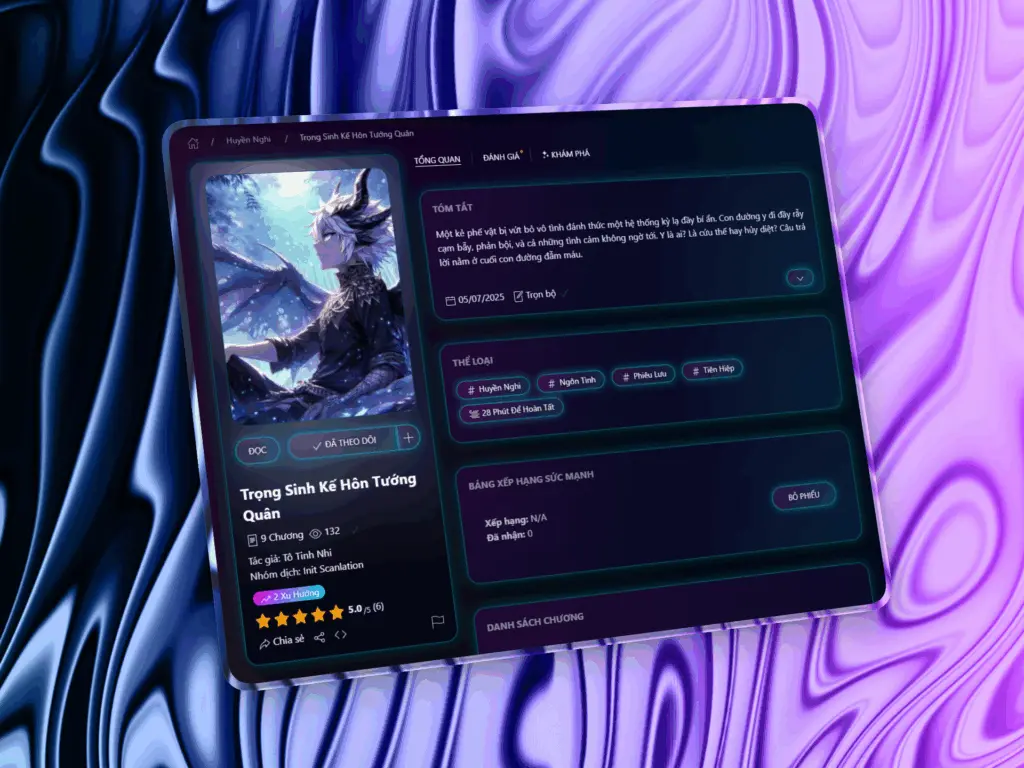
- Neon-lit buttons with vivid glow and futuristic HUD styling.
- Hover effects featuring smooth pulse animations and light-sweep sheen.
- Designed for high-impact visuals while staying readable and usable.
Dark Mode lock-in for consistent Cyberpunk visuals
- Cyberpunk Skin always enforces Dark Mode for maximum visual coherence.
- The theme toggle is hidden to prevent unintended style clashes.
How to enable these skins
- Go to Init Manga → Appearance → Skin Style.
- Choose Retro or Cyberpunk.
- Save changes and enjoy the updated look instantly.
Try the new skins today
Init Manga v1.8.7 delivers a major visual upgrade with two distinct styles: the warm, inviting Retro Skin and the high-energy Cyberpunk Skin. Update to the latest version and customize your site’s look with just one click.









Comments