
This release focuses on improving editorial efficiency, reducing repetitive operations, and providing a safe, controlled way to manage chapter access rules at scale — without breaking any existing workflows.
Bulk Chapter Lock Editor
The headline feature of Init Manga v2.0.0 is the new Bulk Chapter Lock Editor, a dedicated admin interface that allows editors and manga authors to select multiple chapters and update their lock settings in a single operation. Instead of manually opening and editing each chapter one by one, staff can now apply consistent access rules across entire chapter ranges in seconds.
The bulk editor is fully integrated into the manga editor screen and does not override or interfere with the existing chapter management flow. It operates as an isolated layer on top of the current system, ensuring zero regression risk for installations that rely on complex scheduling, ghost chapters, caching, or notification logic.
Multi-Select Chapter Interface
Each chapter row now includes a selection checkbox, enabling precise multi-selection without affecting existing Edit or Delete actions. A contextual bulk action footer automatically appears when chapters are selected, providing a clean, focused workflow for batch operations.
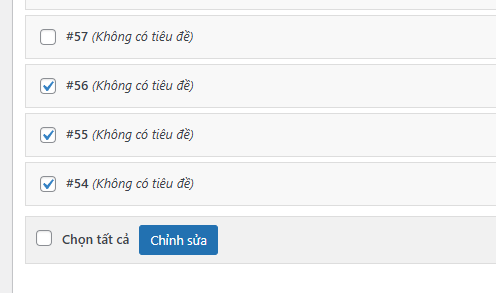
This footer includes real-time selection counts and controls for selecting all chapters on the current page, making it easy to operate on large chapter sets without losing track of scope.
Lock-Only Safe Editing Mode
To guarantee data safety, bulk operations are strictly limited to updating chapter lock settings. Only the lock_type and lock_value fields can be modified in bulk. Chapter numbers, slugs, schedules, content, and metadata remain completely untouched.
This design ensures that large-scale administrative changes cannot accidentally corrupt chapter ordering, break SEO-friendly slugs, or disrupt scheduled publishing behavior.
Quick Lock Presets
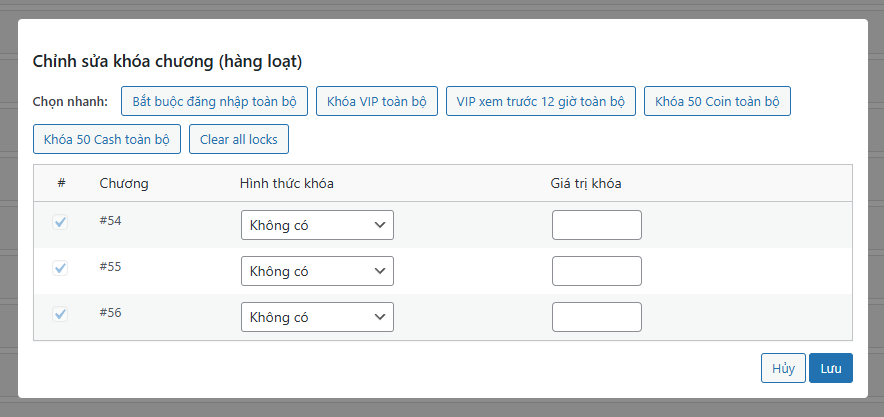
Init Manga v2.0.0 introduces one-click lock presets for the most common access control scenarios. Editors can instantly apply consistent locking rules across selected chapters using preset buttons such as:
- Clear all locks
- Require login
- VIP only
- VIP early access (12 hours)
- Require 50 coins
- Require 50 cash
These presets dramatically reduce manual input, prevent configuration mistakes, and make large editorial updates both faster and more predictable.
Scrollable Bulk Editing Modal
When editing large chapter selections, the bulk editor modal automatically constrains its internal table height and provides a dedicated scroll region. This prevents the interface from overflowing the viewport and keeps critical actions such as Save and Cancel consistently visible.
Sticky table headers further improve usability, ensuring column labels remain visible even when working with long chapter lists.
Per-Page Chapter Selection via Screen Options
Init Manga v2.0.0 replaces the hardcoded chapter list limit with native WordPress Screen Options support. Editors can now configure how many chapters are displayed per page, from 10 up to 100, on a per-user basis.

This enhancement allows high-volume series to be managed more efficiently while preserving optimal performance and pagination behavior for all existing installations.
Strict Permission Mirroring
Bulk chapter updates reuse the same permission model as single-chapter editing. Only Editors, Administrators, or the original manga author can apply bulk changes.
This ensures consistent security behavior across all chapter operations and prevents unauthorized modifications in multi-author environments.
Cache-Safe Bulk Operations
All bulk updates automatically purge the affected chapter caches and clear the manga-level chapter cache. This guarantees that new lock states are reflected immediately on the frontend and prevents stale data from being served to readers.
Cache invalidation is performed at the most granular level possible to avoid unnecessary cache stampedes or performance regressions.
Isolated Architecture with Zero Flow Impact
The bulk editing system is implemented as a fully isolated admin module. It does not override existing IMC core logic, does not hook into the chapter save pipeline, and does not mutate any legacy JavaScript behavior.
This architecture guarantees that upgrading to v2.0.0 will not introduce regressions or behavioral changes in existing chapter workflows.
Conclusion
Init Manga v2.0.0 delivers a robust and production-safe bulk editing system tailored for large manga libraries and professional editorial teams. By combining safe lock-only operations, native WordPress UX integration, granular cache handling, and strict permission mirroring, this release significantly improves administrative productivity without compromising data integrity.
For sites managing high-volume chapter catalogs, Init Manga v2.0.0 represents a major leap forward in operational efficiency and long-term maintainability.










Comments