
Pin Priority System – Smart Display Order Management
Instead of relying on WordPress’s default sticky post feature, Init Manga 2.0.6 introduces a numeric priority-based pinning mechanism for all cosmetic item types including Stickers, Avatar Frames, and Name Effects. Administrators can now assign numerical priority values (higher numbers get priority) directly in the metabox when editing products, allowing precise control over display order on default archive pages.
The brilliance of this system lies in its flexibility and intelligence: pinned items only appear in priority positions when users view the default sort order. As soon as they switch to sorting by price or popularity, the system automatically disables pinning to ensure results remain accurate and semantically correct.
A built-in safe migration mechanism automatically backfills default priority values (0) for all existing items through WP_Query batch processing, ensuring no database impact and complete backward compatibility.
Preview Modal – Experience Before Purchase
The standout feature of version 2.0.6 is the Avatar Frame & Name Effect Preview Modal – an elegantly designed preview window based on the actual comment interface. Instead of just looking at static images, users can now see exactly how an avatar frame or name effect will appear when applied to their account, including VIP badges, level badges, and name effects rendered using the actual production rendering pipeline.
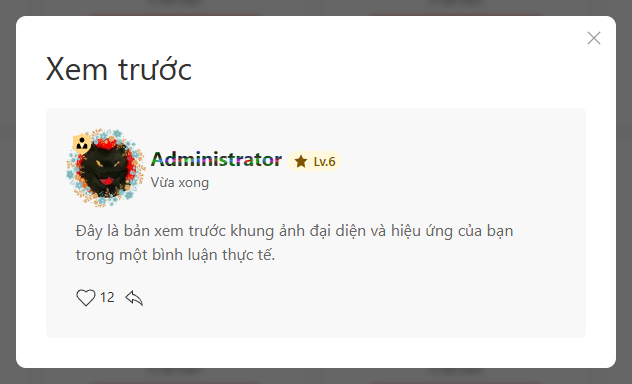
The “Try” button appears on each Frame and Effect product in archive pages, allowing users to activate the preview modal with a single click. All preview states are stored in local storage, meaning when users navigate between pages or switch between Frame and Effect categories, their preview selections remain intact, creating a seamless and convenient experience.
Optimized Technical Architecture
Technically, the pin priority system uses meta keys _effect_priority, _frame_priority, and _sticker_priority combined with orderby meta_key for sorting, ensuring high performance and easy scalability.
The preview modal is built with vanilla JavaScript combined with UIkit, avoiding heavy library dependencies, while reusing existing rendering functions like init_manga_render_effect(), init_manga_vip_badge(), and init_manga_get_level_badge() to ensure consistency between preview and actual results.
Conclusion
Init Manga 2.0.6 is not just a routine bug fix but a strategic upgrade aimed at perfecting the virtual items store experience. From administrators with flexible display order management tools to users with authentic preview capabilities before making purchase decisions, this version marks Init Manga’s maturity in building a complete and professional virtual economy platform.










Comments