
Instead of manually inserting raw links or relying on additional plugins, Init Press now includes a built-in download system directly inside the theme. This keeps your website lightweight while providing a smoother workflow for both content creators and readers.
Add Download Links directly in the post editor
Init Press 1.1.8 adds a new metabox inside the WordPress post editor that allows you to create multiple download links easily. Each link includes a title and a file URL so readers clearly understand what they are downloading.
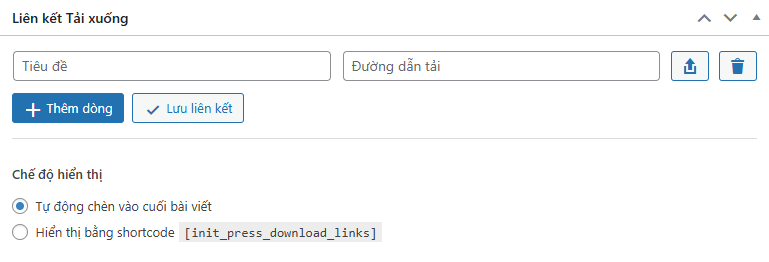
You can quickly add multiple download rows with a single click. The interface is simple, intuitive, and optimized for fast content publishing.
Integrated WordPress Media Library
No more copying file URLs manually. The Download Links system allows you to select files directly from the WordPress Media Library. With a single click, you can upload or choose an existing file and automatically insert its URL into the download field.
This integration is especially useful for websites that frequently share files such as documents, ebooks, software packages, or other downloadable resources.
Smart auto-save functionality
Init Press 1.1.8 includes an intelligent auto-save system for download links. When both the title and URL are filled in, the system automatically saves the data in the background without requiring a page reload.
A debounce mechanism ensures that unnecessary requests are avoided, keeping the editor responsive even when multiple download links are being added.
Flexible display modes
The Download Links feature supports two different display modes to suit different content layouts.
- Automatic Mode: the download section is automatically appended to the end of the post.
- Shortcode Mode: authors can insert the shortcode
[init_press_download_links]anywhere inside the content to control exactly where the download block appears.
This flexibility makes it easier to organize content, especially in long articles or tutorial posts that include downloadable resources.
Built-in download counter
Each download link automatically tracks how many times the file has been downloaded. When a user clicks the download button, the system first redirects through a tracking URL before sending the user to the original file.
This allows Init Press to accurately record download statistics for every file, and the count is displayed directly in the frontend interface.
Modern and clean download interface
The download section is displayed using a clean card-style layout that includes an icon, file title, download count, and a clear download button. This makes the download area visually appealing while keeping it consistent with the overall design of the theme.
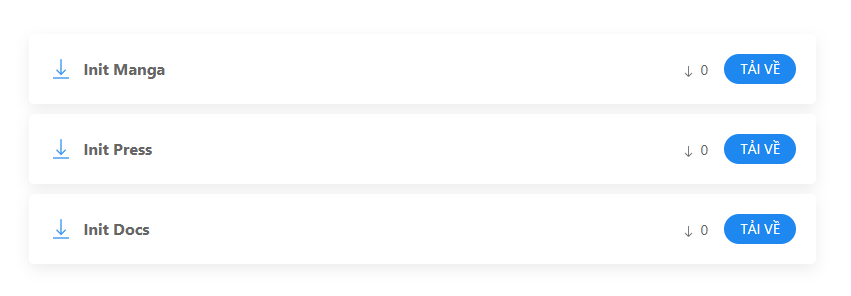
The layout is also optimized for responsive design, ensuring a smooth experience across both desktop and mobile devices.
Security and performance optimization
The Download Links system is built with multiple layers of validation and sanitization to ensure website security. All AJAX requests are protected with nonces and permission checks.
The download redirect system also prevents browser or CDN caching so that download counters remain accurate.
Conclusion
Init Press 1.1.8 delivers a valuable upgrade for websites that frequently share downloadable files. With the built-in Download Links system, administrators can manage file downloads directly inside posts, track download statistics, and present resources in a clean and professional layout.
This feature may seem simple, but it significantly improves usability and turns Init Press into a more powerful and practical WordPress theme for content-driven websites.










Comments