
Tags Aren’t Just for Display — They Define the Topic
In WordPress, post_tag is often underrated. Many users don’t even use tags properly, and most search plugins completely ignore them.
But on technical blogs, documentation hubs, or in-depth knowledge bases, tags tell the system: “This post is about php, javascript, seo, or tailwind — show it when someone searches for these terms.”
Tags aren’t decoration. They’re signal. Ignoring them means overlooking the most semantic part of your post’s structure.
Searching by Title Alone Isn’t Enough
Most search tools only focus on:
post_titlepost_excerptpost_content
Even with fuzzy search, fulltext, or AI suggestions — tags are still left out.
Result: You search for “SEO”, and posts with the tag seo aren’t prioritized. Worse: you type “tailwind css” and only see titles that contain the word “tailwind,” while more relevant posts tagged with tailwind and css are buried.
What Does Init Smart Tag-Aware Search Do Differently?
Since version 1.5.2, Init Live Search includes a smarter mode that:
- Searches by
post_titleas usual - Then checks if
post_tagmatches the full keyword - If the keyword has 2+ words (e.g., “deep learning”), it splits and matches individual terms in tags
So short tags like seo, php, css, ux can now shine.
It uses plain MySQL — no AI, no third-party APIs, no bloated dependencies.
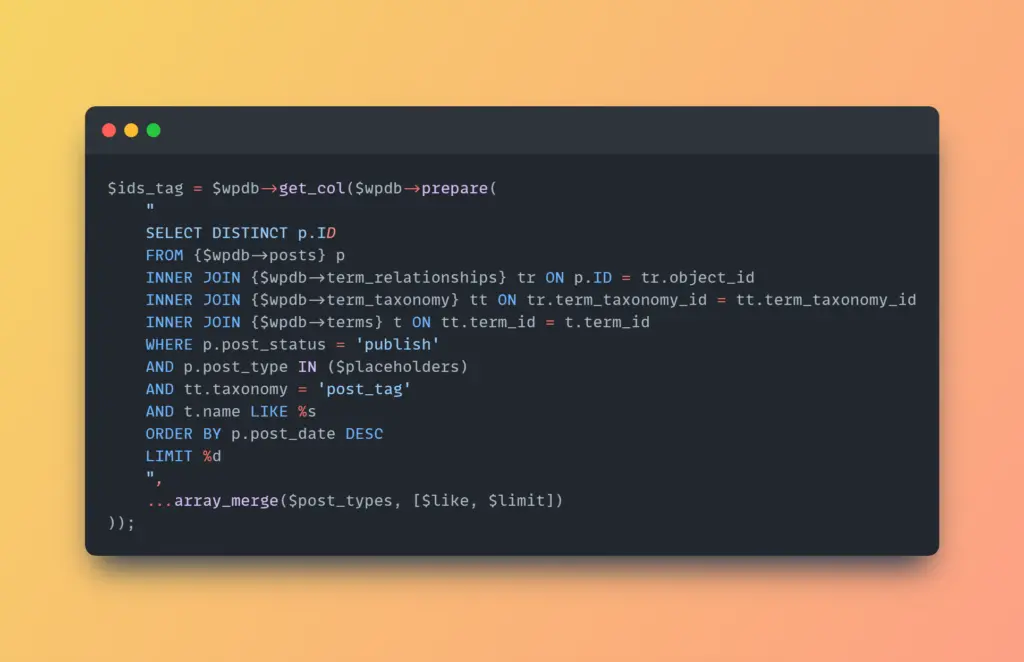
Part of the internal logic: matching post tags directly via SQL.
When to Enable (and When Not To)
Recommended if:
- Your site uses a well-organized tagging system
- You’re running a technical blog, documentation site, or tutorials
- Your tags are meaningful: e.g.,
docker,laravel,ux,html5
Avoid enabling if:
- Your tags are generic like
blog,update,misc - Your tag structure is messy or duplicated
- You don’t actively manage tags across your site
The better your tag system, the more powerful this feature becomes.
Why Not Use Fulltext, AI, or Vector Embedding?
Because you don’t need the complexity.
What you need is a system that respects the content creator’s intent — not a remote guessing algorithm.
Init Live Search favors simplicity, performance, and accuracy. No jQuery. No page reloads. No bloat. Just efficient search, built right.
How to Enable
Go to:
Settings → Init Live Search → Search Behavior → Enable Init Smart Tag-Aware Search
Now try searching for terms that used to miss your best content — if your tags are well curated, you’ll notice the difference immediately.
Comparison Table: 4 Search Modes
| Mode | Search Scope | Strengths | Best For |
|---|---|---|---|
| Title Only | Post title only | Fast, precise, minimal noise | News sites, short blogs, keyword-rich titles |
| Title & Excerpt | Title + excerpt | Balanced speed and coverage | Blogs, portfolios, personal sites |
| Title, Excerpt and Content | Entire post body | Deep scan, comprehensive | Technical docs, long-form content |
| Init Smart Tag-Aware Search | Title + tags (with smart fallback) | High precision if tags are solid | Well-structured, topic-rich websites |
Each mode serves a different content strategy. Init Live Search doesn’t guess — it lets you choose.
Conclusion
Tags are your content’s most meaningful metadata. Init Smart Tag-Aware Search helps you harness them — the smart, lightweight way.
This feature isn’t designed for the masses — it’s made for those who take their content architecture seriously. If your tag system is solid, this mode can drastically improve the accuracy and relevance of your search.
For everyone else, Init Live Search still offers flexible modes like Title Only, Title & Excerpt, and Title, Excerpt and Content — suitable for all use cases from personal blogs to WooCommerce shops to headless apps.










Comments