Table of Contents
- Supported Events
- ils:modal-opened
- ils:modal-closed
- ils:search-started
- ils:results-loaded
- ils:result-clicked
- How to Use
- Advanced Use Cases
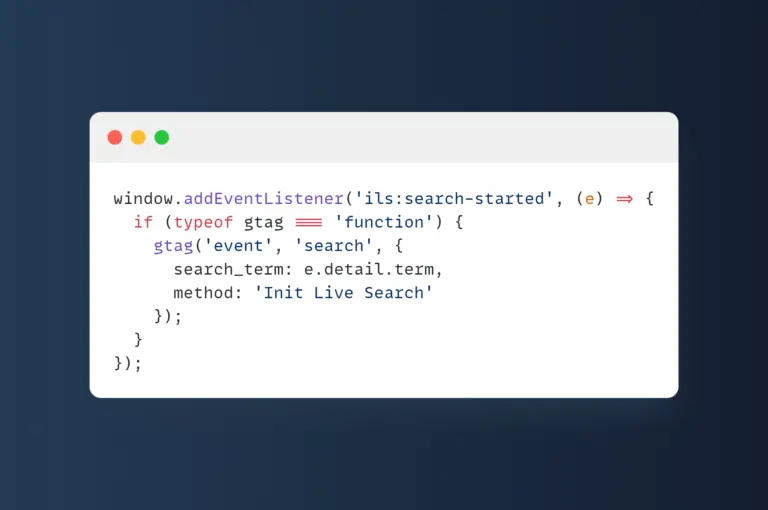
- Send Search Terms to Google Analytics
- Track Clicked Results
- Add Animation on Modal Open
- Toggle Custom Loading Spinner
- Suggest Command When No Results Found
- Analyze WooCommerce Product Prices
- Auto Scroll to Results
- Notes
- Conclusion
Supported Events
Events are triggered using window.dispatchEvent() or new CustomEvent() during various stages of user interaction with the search modal:
ils:modal-opened
Fires when the search modal is opened. No event.detail.
ils:modal-closed
Fires when the modal is closed. No event.detail.
ils:search-started
Fires when the user starts typing a keyword. event.detail contains:
{
  "term": "string"
}
ils:results-loaded
Fires when search results have been rendered. event.detail includes:
{
  "count": 10,
  "append": false,
  "command": {
    "cmd": "recent",
    ...
  }
}
ils:result-clicked
Fires when the user clicks on a result. event.detail includes:
{
  "id": 123,
  "url": "https://example.com/post",
  "title": "Post title",
  "type": "post",
  "category": "news",
  "command": "recent"
}
How to Use
You can bind listeners to the window or document:
window.addEventListener('ils:modal-opened', () => {
  console.log('Modal opened');
});

window.addEventListener('ils:search-started', e => {
  console.log('Searching for:', e.detail.term);
});

window.addEventListener('ils:results-loaded', e => {
  console.log(`Loaded ${e.detail.count} results from command:`, e.detail.command);
});

window.addEventListener('ils:result-clicked', e => {
  console.log('User clicked on:', e.detail.title);
});
Advanced Use Cases
Send Search Terms to Google Analytics
window.addEventListener('ils:search-started', (e) => {
  if (typeof gtag === 'function') {
    gtag('event', 'search', {
      search_term: e.detail.term,
      method: 'Init Live Search'
    });
  }
});
Track Clicked Results
window.addEventListener('ils:result-clicked', (e) => {
  if (typeof gtag === 'function') {
    gtag('event', 'click_result', {
      event_category: 'Live Search',
      event_label: e.detail.title,
      post_id: e.detail.id,
      post_type: e.detail.type,
      command: e.detail.command
    });
  }
});
Add Animation on Modal Open
window.addEventListener('ils:modal-opened', () => {
  document.body.classList.add('ils-modal-visible');
});
window.addEventListener('ils:modal-closed', () => {
  document.body.classList.remove('ils-modal-visible');
});
Toggle Custom Loading Spinner
window.addEventListener('ils:search-started', () => {
  document.querySelector('#my-spinner')?.classList.remove('hidden');
});
window.addEventListener('ils:results-loaded', () => {
  document.querySelector('#my-spinner')?.classList.add('hidden');
});
Suggest Command When No Results Found
window.addEventListener('ils:results-loaded', (e) => {
  if (e.detail.count === 0) {
    const el = document.querySelector('#ils-suggestion');
    if (el) {
      el.innerHTML = 'No results found. Try <kbd>/popular</kbd> or <kbd>/random</kbd>.';
    }
  }
});
Analyze WooCommerce Product Prices
window.addEventListener('ils:results-loaded', (e) => {
  if (e.detail.command === 'product') {
    document.querySelectorAll('.ils-item').forEach(el => {
      const price = parseFloat(el.dataset.price);
      if (!isNaN(price) && price <= 100) {
        el.classList.add('ils-low-price');
      }
    });
  }
});
Auto Scroll to Results
window.addEventListener('ils:results-loaded', () => {
  const target = document.querySelector('.ils-results');
  if (target) {
    const top = target.getBoundingClientRect().top + window.scrollY - 50;
    window.scrollTo({ top, behavior: 'smooth' });
  }
});
Notes
- Events are only triggered while the modal is active.
- Can be used to sync external UI or for tracking purposes.
- The event system is open and extensible — more events can be added as needed.
Conclusion
The ils:* event system in Init Live Search offers developers a powerful way to extend search behavior without altering plugin code. From analytics and UI effects to interactive customizations, you gain full control over the search experience.








Comments