To access the Settings page, go to Init Manga → Settings. Note: You must activate your license before you can save any changes.
1. URL Slugs
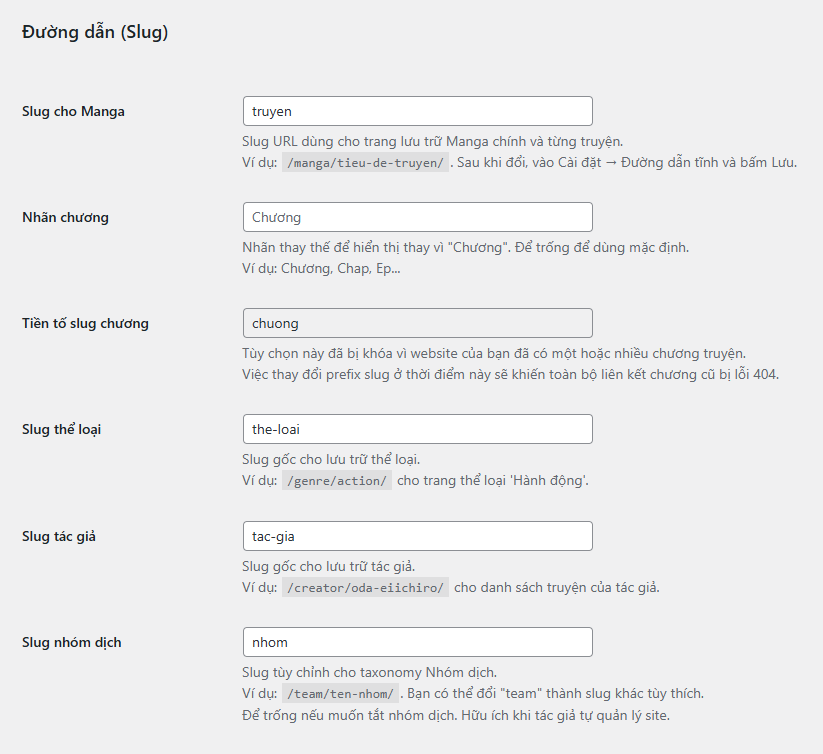
You can configure the slug for major components as follows:
- Manga Slug: Slug for the manga archive page. Default is
/manga/. - Chapter Label: Customize the chapter name display, such as “Chap” or “Ep”.
- Chapter Slug Prefix: Prefix used for chapter URLs like
chapter-1. This field is locked if your site already has chapters. - Genre / Author / Team Slug: Slugs for the corresponding taxonomies. You may leave Team Slug blank if you don’t use translation teams.
- Team Slug notice: If Author Mode is enabled, the Team Slug field will be locked (read-only).
After changing any slug, go to Settings → Permalinks and click Save to flush the rewrite rules.
2. Social & Notifications
The theme supports social media links like Facebook, Discord, Threads, TikTok, YouTube, etc. Icons will display automatically if you enter valid URLs. If left blank, icons will not show.

You can also enter a homepage notice using HTML, which will appear prominently. Additionally, there are fields for Copyright Text and a Footer Disclaimer, both of which support HTML.
Announcement Bar: Enter content (HTML supported) to display a prominent notice at the top of the site.
- Show Announcement Bar on All Pages: Enable to display the announcement bar across the entire website (default: homepage only).
Sign-up Notice: A sign-up/login call-to-action block displayed at the bottom of pages.
- Mascot Image: URL to the mascot image for the Sign-up Notice (leave empty to hide entirely).
- Show on All Pages: Enable to display the Sign-up/CTA block on all pages (default: homepage only).
3. Header & Footer Scripts
There are two sections for injecting custom scripts:
- Header Script: Injected before the
</head>tag – for meta tags, analytics, etc. - Footer Script: Injected before
</body>– suitable for lightweight JS or widgets.
Note: Only insert code you trust, as it will be rendered directly on the site.
4. Bad Words Filter
Intelligent comment moderation system with advanced filtering algorithm:
- Bad Words List: Enter inappropriate words to filter, separated by commas – example:
word1,word2,word3 - Whole-word Matching: Only replaces complete words, preserving context – “bad” → “—” but “badge” remains unchanged
- Automatic Replacement: Inappropriate words will be replaced with
—in all comments - Disable Filter: Leave textarea empty to completely disable the filtering system
5. Content Protection
Init Manga includes multiple layers of content protection to prevent scraping and plagiarism:
- Encrypted Chapters: Chapter content is encrypted and only decoded via JavaScript when viewed by real users.
- Inject Noise: Inserts invisible
<span>elements randomly into chapter content. - Obscure Keywords: Enter a list of keywords to hide. These will be visually replaced using CSS
::beforeand won’t appear in the raw HTML. - JavaScript Protection: Disables right-click, copy, printing, and blocks Developer Tools.
These settings are found in the Content Protection section. Enable multiple layers together for optimal defense while maintaining good user experience.
SEO note: If you enable chapter encryption, raw text will no longer be present in the HTML — simple crawlers and search bots may not be able to read it.
6. Advanced Features
- Enable Power Stone: Enable the Power Stone voting system.
- Filter 18+ for Guests: Hide adult-rated manga from users who are not logged in.
- Reading Position Tracking: (requires Init Reading Position) – Save scroll position in chapters.
- Homepage Chatbox: (requires Init Chat Engine) – Enable a community chatbox on the homepage.
- Force HTTPS for Images: Automatically convert all image URLs to
https://to avoid mixed content warnings. - Reader Drop-off Analytics: Show warning badges on chapters with high drop-off rates (behavior analysis).
- Series Health: Visible to admins, editors, and the manga author; includes a progress bar and metrics: Views, Momentum, Retention, Engagement, Freshness, Playlist.
- Smart Personalized Notifications: Send personalized manga suggestions based on reading behavior and optimal timing.
7. Forum Settings
- Require Approval: New forum posts will be marked as “pending” and require manual admin approval before publishing.
8. Reading Challenge
This is a Reading Challenge system designed to boost user engagement by rewarding EXP, coins, and cash when users reach specific reading milestones (e.g., 100, 200, 500 chapters, etc.).
You can configure the rewards by entering a formatted string in the settings field, using the following structure:
chapters:exp:coin:cash, with each milestone separated by semicolons.
Example: 100:100:50:10;200:200:75:15;500:500:150:25
This means:
- Reading 100 chapters = 100 EXP + 50 coins + 10 cash.
- Reading 200 chapters = 200 EXP + 75 coins + 15 cash.
- Reading 500 chapters = 500 EXP + 150 coins + 25 cash.
The system automatically distributes the rewards, sends inbox notifications, and logs each transaction. Milestone tracking is stored in user meta to prevent duplicate rewards.
Conclusion
The Init Manga Settings page is minimal but powerful, allowing you to configure your entire site interface without writing a single line of code.
Mastering these options helps you build a high-quality manga website optimized for both UX and performance.
Always activate your license to unlock all features, and don’t forget to save changes after each update.










Comments