
How Snowfall Works in Init FX Engine
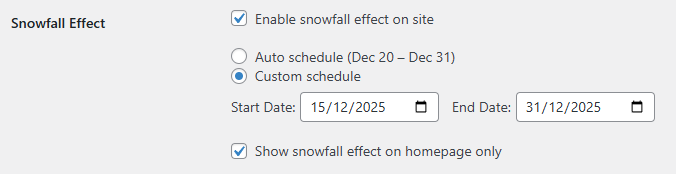
The Snowfall feature is designed to be simple, clean, and performance-friendly. Once enabled in the admin panel, the plugin automatically checks whether the effect should run and only activates it when the conditions are met.
- Enabled: if disabled, no scripts are loaded at all.
- Auto mode: runs automatically from December 20 to December 31.
- Custom mode: allows you to define your own start and end dates.
- Homepage only: limits the snowfall effect to the homepage.
Performance-first Design: No Unnecessary Script Loading
Many visual-effect plugins load JavaScript on every page, even when the effect is not visible or out of season. Snowfall in Init FX Engine avoids this problem by checking all conditions before enqueueing any scripts.
- If Snowfall is disabled, nothing is loaded.
- If the current date is outside the configured range, nothing runs.
- If “Homepage only” is enabled, inner pages remain untouched.
Automatic Christmas Schedule with Auto Mode
Auto mode is ideal if you want a “set it and forget it” solution. The snowfall effect automatically activates between December 20 and December 31 of the current year, then stops on its own after the holiday season.
Flexible Campaign Timing with Custom Mode
For promotional campaigns or special events, Custom mode lets you define exactly when the snowfall effect appears. You can start earlier in December, stop before Christmas, or extend the effect into New Year’s Day if needed.
Show Snowfall Only on the Homepage

On content-heavy websites, constant visual effects on every page may become distracting, especially on mobile devices. The Homepage only option ensures the snowfall effect creates a festive first impression while keeping inner pages clean and readable.
Smart Script Loading in Init FX Engine
When all conditions are satisfied, Init FX Engine loads only the required files:
- particles.min.js – a lightweight particle engine.
- fx-snowfall.js – handles snowfall rendering and behavior.
All Snowfall settings are passed to the front end via window.INIT_FX.snowfall, ensuring the effect is rendered exactly according to your configuration.
Conclusion
If you are looking for a simple and efficient way to add a snowfall effect to your WordPress site in December, Snowfall in Init FX Engine is a solid choice. It delivers a festive experience at the right time, without sacrificing performance or control.










Comments