
Init ID Photo Studio is a browser-based ID and visa photo tool that runs entirely in your browser — no need to upload images to any server. Using AI background removal from IMG.LY and precise Canvas 2D cropping, every operation from framing, rotating, changing background colors to print sheet layout happens 100% on your device. No files ever leave your device, and no one can view or store your photos.
Introduction
With Init ID Photo Studio, you can create ID photos, passport photos, and visa photos in exact standard sizes for dozens of countries in just minutes, right in your browser. The tool supports full preset size standards — Vietnam 3×4, 4×6, US/India 2×2 inch, UK/Schengen/EU/Australia/Japan/Korea 35×45 mm, China Visa 33×48 mm, Canada 50×70 mm — plus fully customizable dimensions in millimeters. Integrated AI background removal automatically removes existing backgrounds and replaces them with standard document colors (white, blue, light blue for China visa, light grey for UK passport). After editing, you can arrange multiple photos onto a single print sheet (10×15 cm, 13×18 cm, A4) to take to a photo lab or print at home.
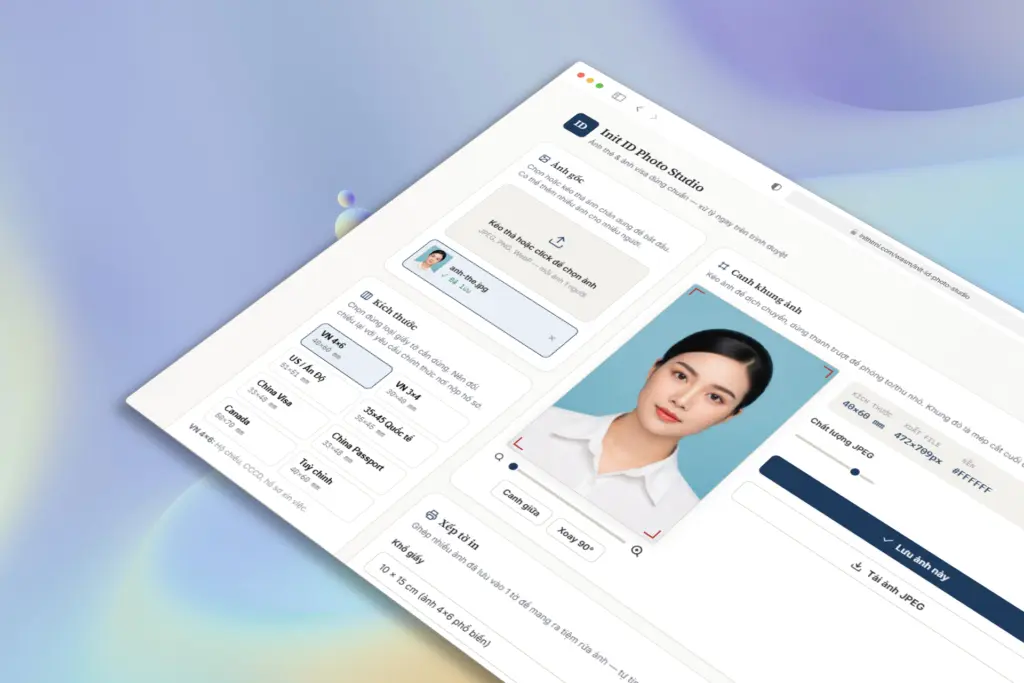
All you need to do:
- Drag and drop or select a portrait photo from your device (you can add multiple photos for multiple people)
- Select the correct document type from presets — VN 4×6, VN 3×4, US/India, 35×45 International, China Visa, China Passport, Canada, or custom dimensions
- Optionally enable AI Background Removal to automatically remove the background, choose AI quality (high or fast)
- Select the output background color — White, Blue, Light Blue (China Visa), Light Grey (UK Passport), or any custom color
- Select print resolution — 300 DPI standard for ID photos, 600 DPI extra sharp, or 150 DPI for light online submission only
- Frame the photo — drag to pan, use the slider to zoom in/out, Center and Rotate 90° buttons for easy adjustment
- Adjust JPEG quality (60–100) to balance between file size and sharpness
- Click "Save this photo" to export the precisely cropped standard photo
- Switch to the "Print sheet" tab — select paper size (10×15, 13×18, A4), enter quantities for each photo or use Auto-fill, then download the print sheet JPEG
- Or click "Download ZIP of all saved photos" to batch export multiple photos at once
All photos are processed entirely on your device. No data is sent anywhere, nothing is stored in the cloud, and there is no limit on the number of files. You can process 1 photo or multiple photos for many people at the same time, limited only by your browser's memory.
Real-world Applications
- ID and visa photo preparation: Crop to exact standard sizes for each country — Vietnam 3×4, 4×6, US 2×2, UK/Schengen 35×45, China Visa 33×48, Canada 50×70 — no need to visit a photo studio
- Automatic AI background removal: Remove old backgrounds and replace with standard document colors (white, blue, grey) with a single click, no Photoshop skills needed
- Batch print preparation: Arrange multiple 3×4 or 4×6 photos onto a single 10×15 cm or A4 sheet to save paper, automatically calculating how many photos fit the paper size
- Photographers & small studios: Process ID photos for multiple clients simultaneously, batch export ZIP files, support multiple different sizes in one working session
- Study abroad & work abroad: Prepare visa photos for USA, Canada, Australia, Japan, Korea, UK, Schengen with exact background colors and dimensions required by each embassy
- Reuse old portrait photos: Take an old portrait photo, remove background with AI, change to new background color, crop to current standard size for reuse
- Personal information security: Process ID card photos, passport photos, and sensitive documents without worrying about server storage. 100% client-side
- Home printing: Choose appropriate DPI (300/600), arrange print sheets to exact paper sizes, download and print directly on your personal photo printer
Key Features
- 100% Client-Side: All photo cropping, AI background removal, and print sheet layout operations happen in your browser, no upload, no server, no one can see your photos
- Multi-country standard size presets: Vietnam 3×4, Vietnam 4×6, US/India 2×2, UK/Schengen/EU 35×45, China Visa 33×48, China Passport, Canada 50×70, and fully customizable dimensions
- AI Background Removal (IMG.LY): Automatic background removal technology, replace with standard colors. Choose high quality (isnet_fp16) or fast (isnet_quint8). First run downloads model (tens of MB), subsequent uses cached
- Flexible background color change: 4 standard colors ready (White, Blue, Light Blue China Visa, Light Grey UK Passport) + custom color picker for any color
- Precise framing: Drag to pan, zoom slider, Center and Rotate 90° buttons. Red frame shows final crop area
- Adjustable print resolution: 300 DPI standard ID photo, 600 DPI extra sharp, 150 DPI light for online submission only
- Customizable JPEG quality: Slider 60–100 to balance file size and photo sharpness
- Smart print sheet layout: Automatically calculates how many photos fit paper sizes 10×15, 13×18, A4. Supports auto-fill, individual quantity adjustment, preview before printing
- Multi-person batch processing: Add multiple photos to the list, switch between photos, each photo keeps its own crop state and background settings
- Multiple export options: Download individual JPEG photos, download pre-arranged print sheet JPEG, or export ZIP of all saved photos
- Bilingual interface: Supports Vietnamese and English, auto-detects from browser, saves preference to localStorage
- Professional design: Light elegant interface, traditional serif typography combined with modern sans-serif, responsive on all devices from desktop to mobile
- No installation required: Open your browser and use it, no software needed, no account required, no usage limits
How to Use
- Visit inithtml.com/wasm/init-id-photo-studio and drag & drop a portrait photo into the upload zone or click to select a file
- Select the correct document size from the preset list — VN 4×6, VN 3×4, US, 35×45 International, China Visa, Canada, or Custom
- Optional: enable AI Background Removal to automatically remove the background, choose AI quality (high/fast)
- Select the output background color appropriate for your document requirements (white, blue, grey...)
- Select print resolution (default 300 DPI) and adjust JPEG quality if needed
- In the Frame photo area, drag to adjust position, use the slider to zoom, click Center or Rotate 90° if needed
- Click "Save this photo" — the photo will be precisely cropped to standard and saved to the list
- Switch to the "Print sheet" tab, select paper size (10×15, 13×18, A4)
- Enter the quantity for each photo you want to print, or click "Auto-fill" to maximize the number of photos fitting the sheet
- Preview the print sheet, then click "Download sheet (JPEG)" to download and take to a photo lab or print yourself
- Or click "Download ZIP of all saved photos" to export all edited photos to your device
- Click "Remove" on individual photos in the list if you want to delete them, or add new photos to continue
Why Use Init ID Photo Studio?
- No account registration required, no software installation needed
- 100% client-side — photos never leave your device, absolute privacy
- Exact standard ID/visa photo sizes for dozens of countries, no worries about rejected applications
- Automatic AI background removal — professional background removal without Photoshop skills
- Flexible background color change according to each document type requirement (white, blue, grey, custom)
- Smart print sheet layout — save paper, automatically calculate optimal photo arrangement for each paper size
- Intuitive framing — drag, zoom, rotate, center easily on any device
- Process multiple photos for multiple people simultaneously, convenient batch ZIP export
- Choose appropriate print resolution — 300 DPI standard ID photo, 600 DPI extra sharp
- Light elegant interface, professional typography, no ads, no distractions
- Runs on all modern browsers: Chrome, Firefox, Safari, Edge
- Compatible with all devices: desktop, laptop, tablet, mobile phone
Whether you are a student preparing study abroad documents, a worker needing visa photos, a photographer processing ID photos in batches, or anyone who needs a fast, accurate, secure, and unlimited ID photo tool — Init ID Photo Studio is ready in seconds, with no barriers, no privacy concerns.