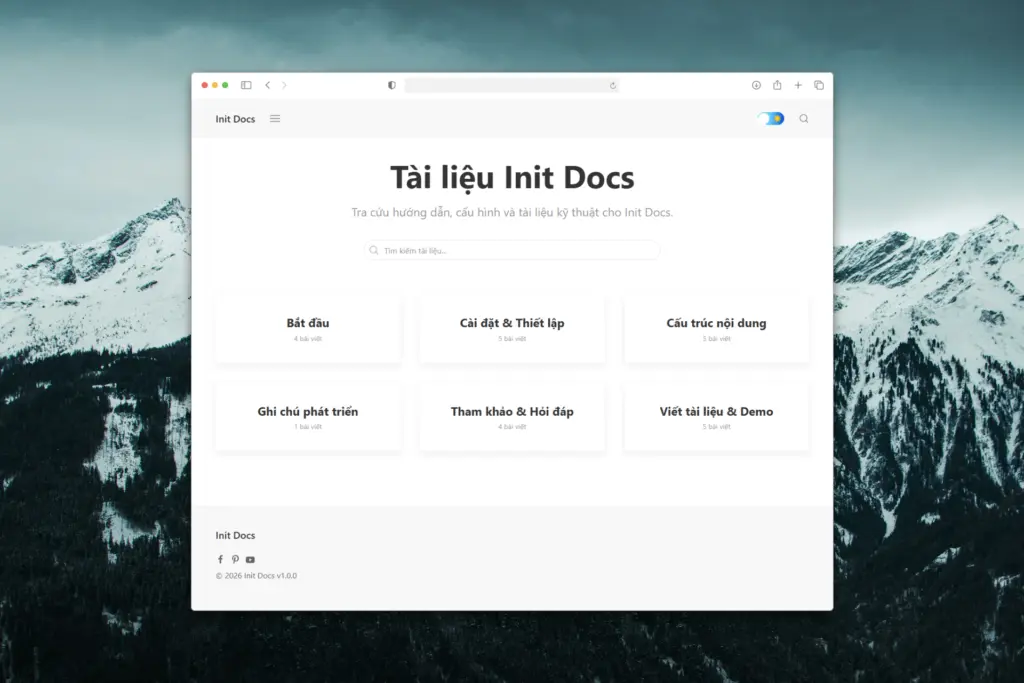
Instead of turning documentation into a blog-like experience, Init Docs deliberately removes distracting elements such as complex layouts, heavy animations, engagement metrics, and non-essential widgets. Its goal is simple: help readers find the right information, read efficiently, understand clearly, and return easily.
Documentation-first design with full focus on content
Init Docs is designed around real documentation reading behavior: scanning, searching, and reading on demand rather than consuming content linearly. The interface stays minimal by intention, ensuring that content always remains the primary focus.
- Clean layout without visual distractions
- Clear heading hierarchy for easy scanning
- Breadcrumb navigation for contextual awareness
- No intrusive blog-centric components
Clean and stable UI built on UIkit
Init Docs is built on UIkit, providing a consistent layout system, reliable responsiveness, and predictable UI behavior across the entire site. UIkit allows the theme to remain lightweight while still being flexible enough for future expansion.
- Mobile-first responsive design
- Readable typography for long-form content
- Stable grid system for category and archive pages
- No dependency on jQuery
High performance for long-term use
Init Docs is designed for long-term operation with minimal maintenance overhead. It follows WordPress best practices for templates, hooks, filters, and internationalization, while avoiding unnecessary frontend logic.
- Minimal assets and fast load times
- Semantic HTML5 for SEO
- Compatible with caching, CDNs, and modern hosting environments
- Clean and readable codebase, easy to customize
Optimized for documentation and knowledge bases
Init Docs is well suited for:
- Product and technical documentation
- User support knowledge bases
- Internal company wikis
- Guides, onboarding materials, and handbooks
The theme is optimized for single documents, category archives, search results, and empty states, ensuring a consistent and distraction-free reading experience throughout the site.
Support for technical content and demos
Init Docs includes a post-level demo system that allows authors to embed custom HTML, CSS, and JavaScript for technical demonstrations. This makes the theme especially suitable for tutorials, developer guides, and instructional content with interactive examples.
- Dedicated Demo metabox for posts
[demo]shortcode for embedding examples- No impact on global layout or performance
Automatic accessibility and SEO improvements
Init Docs includes an automatic image alt text generation system that intelligently derives missing alt attributes from surrounding context. This improves accessibility and SEO without adding extra work for content authors.
Recommended plugins
Init Docs is designed to work seamlessly with a small set of core plugins that enhance search, content discovery, and technical presentation. The following plugins are recommended:
- Init Live Search – Fast, UIkit-styled search for documentation sites.
- Init View Count – Track interest levels and popular content.
- Init Embed Posts – Embed related documentation across pages.
- Prismatic – Syntax highlighting for technical code blocks.
- Classic Editor – A stable editing experience for long-form documentation.
Built for serious users and developers
Init Docs is designed for users and teams who need a WordPress theme that:
- Avoids unnecessary visual effects
- Does not rely on page builders
- Is easy to maintain and operate
- Remains extensible over time
If you are looking for a clean, standards-compliant, and durable WordPress foundation for documentation or knowledge bases, Init Docs is a reliable choice.