
Built with pure Python using the standard curses library. No complex dependencies to install. One command and you get a live-updating TUI with full processlist, buffer pool metrics, QPS tracking, and slow-query alerts — even on the smallest VPS.
Install InitTop
Log in to your Ubuntu VPS as root:
ssh root@your-server-ipThen run the one-line installer:
curl -sSL https://inithtml.com/inittop/install.sh | bashThe script automatically installs python3-mysql.connector, downloads the engine, and auto-launches immediately if an InitOps environment is detected.
Version Info
- Version: 1.0.0
- Updated: 2026-06-18
Usage Flow
- Run the install command: The script auto-detects MariaDB via Unix socket or falls back to TCP.
- Enter password: If
MYSQL_PWDenv var is not set, the tool prompts for hidden input (no history leak). - Monitor in real-time: Processlist refreshes every 2 seconds, sorted by execution time.
What InitTop Shows
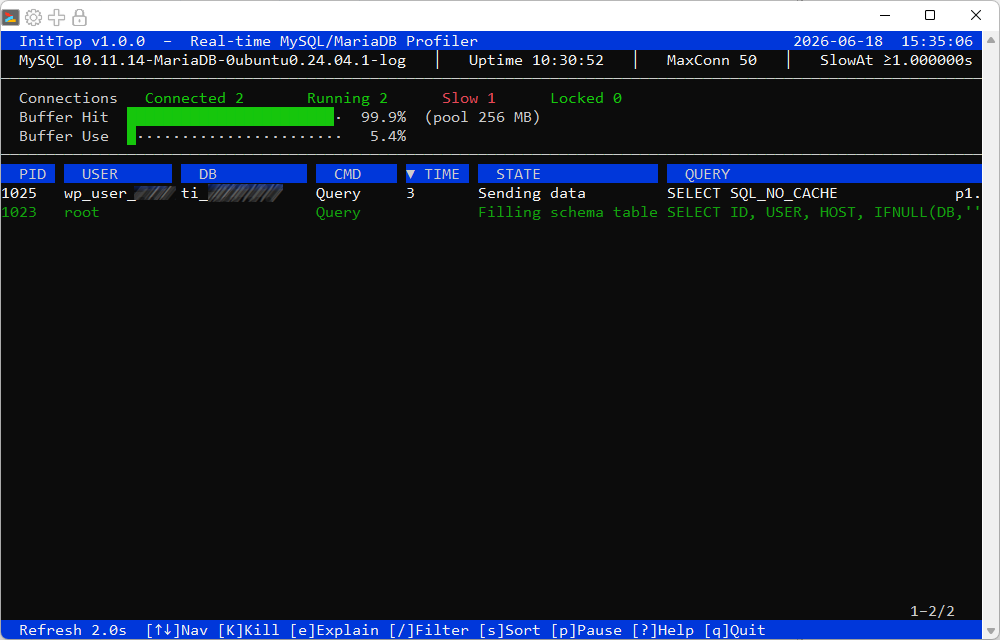
- Real-time Processlist — Running queries sorted by
TIMEdescending. PID, USER, DB, COMMAND, TIME, STATE, and full SQL displayed. - Buffer Pool Metrics — Hit rate and used percentage shown as visual progress bars.
- Connections Overview — Connected, Running, Slow queries, and Locked processes at a glance.
- QPS (Queries Per Second) — Calculated in real-time from
SHOW GLOBAL STATUSdelta. - Index Hint Banner — Auto-detects large tables (>500 rows) without indexes and suggests
ALTER TABLE ... ADD INDEX.
Color-Coded Visual Hierarchy
InitTop uses an 8-color safe palette that renders clearly on any terminal:
- RED bold — Slow query (≥
--slow-threshold) or table/row lock in progress. - YELLOW bold — Moderate query (≥ 1 second).
- GREEN bold — Fast, actively running query.
- DIM white — Sleeping connection (not consuming resources).
- White on blue — Header bar and status bar, classic
htopstyle. - White on black — Currently selected row.
Keyboard Controls
- ↑ / ↓ — Navigate the process list.
- K (capital) — Kill the selected query (
KILL QUERY <pid>). - e — EXPLAIN the selected query (SELECT only).
- / — Filter processlist by user, database, or query text.
- ESC — Clear filter or close overlay.
- s — Cycle sort column: TIME → USER → DB → CMD.
- p — Pause / resume auto-refresh.
- r — Force immediate refresh.
- ? — Toggle help screen.
- q — Quit InitTop.
Flexible Connection Modes
InitTop supports both connection methods, auto-preferring Unix socket when detected:
# Unix socket — recommended for InitOps (faster, more secure)
inittop -u root -S /run/mysqld/mysqld.sock

# TCP fallback — for remote or custom setups
inittop -u root -H 127.0.0.1 -P 3306

# Automation/scripting — use env var, no prompt
MYSQL_PWD=secret inittop -u root -S /run/mysqld/mysqld.sock
Why Not mytop or innotop?
- mytop — Written in Perl from the early 2000s, outdated UI, difficult to install on modern OS.
- innotop — Also Perl-based, heavy CPAN module dependencies, complex configuration.
- Percona Toolkit — Overkill for daily monitoring, requires deep DBA expertise.
- InitTop — Pure Python 3, only requires
mysql-connector-python, single-file executable, runs immediately aftercurl | bash.
System Compatibility
- Ubuntu Server 20.04+ / 22.04+ / 24.04 LTS.
- MySQL 5.7+ / 8.0+ or MariaDB 10.3+ / 10.6+ / 10.11+.
- Terminal with basic 8-color ANSI support (PuTTY, Bitvise, iTerm, GNOME Terminal, etc.).
- Requires read access to
information_schema.PROCESSLISTandSHOW GLOBAL STATUS.
Conclusion
InitTop v1.0.0 simplifies database monitoring — from guessing “why is CPU at 100%” to seeing exactly which query is running slow, needs killing, or needs an index. A production-ready tool that doesn’t require deep DBA knowledge, and especially optimized for environments deployed with InitOps.
Quick Install Command
curl -sSL https://inithtml.com/inittop/install.sh | bash








Comments