
Why use Wasabi Direct Uploader
- Instant deployment: Only one PHP file, no dependencies. Upload it to your server and run.
- Direct browser → Wasabi upload: Your server only signs URLs, it never handles file bandwidth.
- SigV4 standard: Secure presigned PUT with flexible expiration, fully compatible with Wasabi S3 API.
- Automatic bucket handling: Switches to path-style when bucket contains dots to avoid SSL/host mismatch.
- Multiple output formats: Plain URL, HTML <img>/<a>/<video>, Markdown, BBCode, or custom templates.
- Minimal batch-first UI: Single overall progress bar, natural file order.
Version Information
- Version: 1.2.1
- Updated: 2025-12-01
- GitHub: wasabi-direct-uploader
Initial Configuration
After uploading the PHP file to your server, open the CONFIG section at the top and fill in the required values. Starting from version 1.2.0, the tool includes two configuration groups: login protection and Wasabi/CDN settings.
These are the only settings you need to adjust before using the uploader.
USERNAME          = Login username to access the tool
PASSWORD          = Login password (supports plain text or password_hash)

REGION            = Wasabi region (e.g., ap-southeast-1)
BUCKET            = Your bucket name (supports dots in bucket names)
ACCESS KEY        = Wasabi access key
SECRET KEY        = Wasabi secret key
CDN_BASE          = (optional) CDN domain, leave empty to use Wasabi URLs
EXPIRES_SECONDS   = Presigned URL lifetime (default: 3600 seconds)
ALLOW_MIME        = Allowed MIME types ([] = allow all)
FORCE_LOWERCASE   = true/false, convert filenames to lowercase
ADD_RANDOM_PREFIX = true/false, add 12-hex random prefix to avoid collisions
To create a strong password or generate a valid password_hash for PHP authentication, use the official tool Init Password Generator.
Main Features
- Login protection: Only authenticated users can access the uploader. Supports plain or
password_hash()passwords. Theaction=presignAPI is also protected. - Drag-and-drop multi-file upload or file picker selection. Accepts all file types (you can restrict MIME types in the config).
- Custom key prefix with optional date folders
Y/m/dfor time-based organization. - Flexible filename policy: keep original names or use sanitized + lowercase names to avoid invalid characters.
- Collision prevention: optional 12-hex random prefix automatically reduces filename conflicts.
- CDN-ready: set
CDN_BASEto output CDN URLs instead of Wasabi endpoints.
Common use cases
- Publishers, bloggers, marketers: upload batches of images and get HTML/Markdown for CMS integration.
- Product and QA teams: share build files, logs, screenshots with controlled public URLs.
- Content creators: manage static assets for landing pages, emails, documentation.
Requirements and security
- PHP-enabled server (HTTPS recommended).
- Wasabi bucket configured with CORS to allow PUT/GET from your domain.
- Access keys stored only on the server; browser only receives presigned URLs, never the secret key.
3-step installation
- Upload
wasabi-direct-uploader.phpto your web server (preferably over HTTPS). - Edit CONFIG at the top: set
REGION,BUCKET,ACCESS KEY,SECRET KEY, optionallyCDN_BASE,EXPIRES_SECONDS,ALLOW_MIME. - Configure CORS for your Wasabi bucket to allow PUT/GET from your tool’s domain.
Sample Wasabi CORS configuration
{
  "CORSRules": [
    {
      "AllowedOrigins": ["https://your-domain.com"],
      "AllowedMethods": ["PUT", "GET", "HEAD"],
      "AllowedHeaders": ["*"],
      "ExposeHeaders": ["ETag"],
      "MaxAgeSeconds": 3000
    }
  ]
}
Quick usage guide
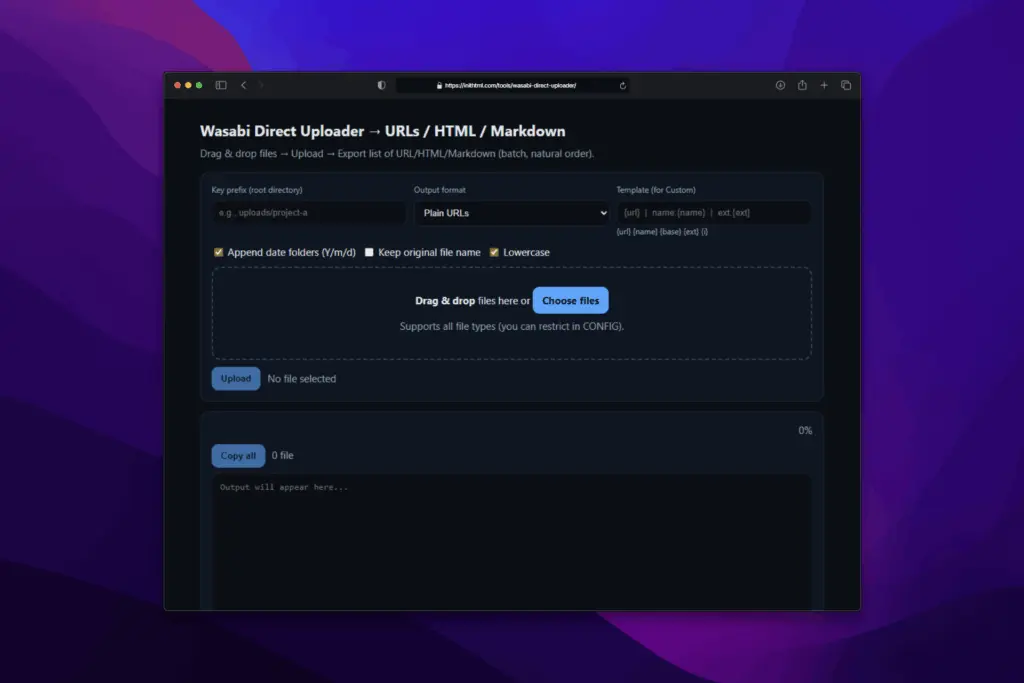
- Open the tool in your browser, set Key prefix if needed (e.g.
uploads/project-a). - Select an Output format: Plain, HTML, Markdown, BBCode, or Custom with placeholders
{url} {name} {base} {ext} {i}. - Drag and drop or choose files, then click Upload.
- Copy the results from the output box and paste into your CMS, website, or docs.
Optimization tips
- SEO & performance: use a CDN for static domains; enable caching and compression.
- Folder conventions: organize by date or project for easy cleanup and tracking.
- MIME restrictions: in public environments, restrict
$ALLOW_MIMEfor security. - Buckets with dots: tool automatically switches to path-style, no renaming needed.
Extended: authentication & access control
The tool can be extended to issue presigned URLs only for authenticated users. Common approaches:
- Web server Basic Auth: protect the PHP file with HTTP Basic Auth (Apache/Nginx).
- Session-based login: add a login form, store sessions in
$_SESSION, check before handling?action=presign. - JWT/Bearer tokens: split the presign logic into an API endpoint, only respond when a valid Authorization token is provided.
- SSO/OAuth2/OpenID Connect: integrate with Google, Microsoft, or Keycloak, then enforce role-based prefix or usage limits.
- Fine-grained policies: enforce per-user prefixes, log presign requests, rate-limit, apply quotas.
These methods ensure only authorized users can generate presigned URLs, while the browser continues uploading directly to Wasabi without exposing credentials.
FAQ
1) Does my server store the files?
No. The browser uploads directly to Wasabi via presigned URLs signed by your server.
2) Do I need the AWS SDK?
No. The tool uses plain PHP to generate SigV4 signatures.
3) Are video and documents supported?
Yes. Any file type can be uploaded; output formats cover multiple use cases.
4) What if my bucket name contains dots?
No problem. The tool automatically switches to path-style addressing to avoid SSL issues.
Conclusion
Wasabi Direct Uploader streamlines file upload and sharing: drag & drop, upload, and instantly copy share-ready URLs or HTML/Markdown. Easy to deploy, secure, and extensible, it’s the ready-to-use tool to standardize your static asset workflow on Wasabi infrastructure.









Gauthier
13/01/2026 lúc 23:27
Hi,
Thanks for this very nice tool.
It seems that Wasabi doesn’t allow CORS options, they tell me that I need to create resigned urls for videos and links when the webpage is called.
Is there a simple way to?
Admin
18/01/2026 lúc 12:34
Thanks for the feedback.
This tool already uses presigned URLs for uploads (PUT).
For video playback, Wasabi may require presigned GET URLs if the bucket is private or if CORS / range requests are restricted. In that case, a backend is needed to generate those URLs when the page loads.
Currently, the tool focuses on upload only. Adding presigned GET for video access would be a separate feature.