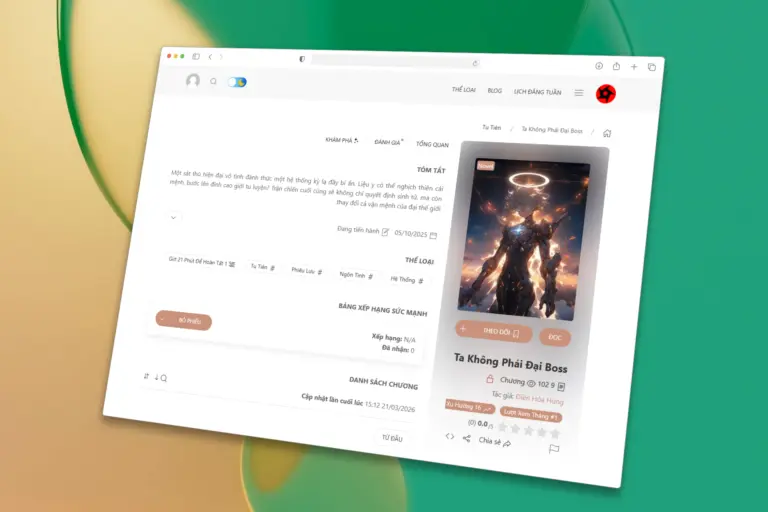
RTL Language Support in Init Manga 2.8.6
The Entire Interface Mirrors Automatically
Once RTL mode is enabled, Init Manga automatically mirrors all the key elements of your site: the navigation bar, logo placement, and slider components all rearrange themselves to match RTL reading direction.
The logo is anchored to the right edge as the main brand touchpoint, while functional icons like search, notifications, cart, and account are grouped neatly on the opposite side, keeping things intuitive for RTL readers.
A Smooth Experience Across Every Device
Beyond the overall layout flip, smaller details like the expandable dropdown menu and the manga/blog sliders have also been fine-tuned to flow naturally in RTL reading order, so browsing genres, exploring listings, or swiping through sliders feels consistent and natural on both desktop and mobile.
How to Enable RTL Mode
After updating to version 2.8.6, simply head to your theme’s Appearance settings, find the Enable RTL toggle, and switch it on. Your entire site instantly shifts to an RTL layout, no further setup needed, ready to serve readers who read right-to-left.
Under-the-Hood Improvements
Alongside the new RTL feature, Init Manga 2.8.6 also ships all RTL styling in its own dedicated stylesheet, loaded only when RTL mode is active, so your site’s default (LTR) performance stays completely unaffected.
With RTL Language Support, Init Manga continues its mission to be a flexible, highly customizable reading platform, ready to serve diverse reader communities around the world without requiring any deep coding knowledge.









Comments