
Supported Events
These events are triggered using window.dispatchEvent() or new CustomEvent() during different stages of user interaction:
ils:modal-opened
Fires when the search modal is opened.
No event.detail.
ils:modal-closed
Fires when the modal is closed.
No event.detail.
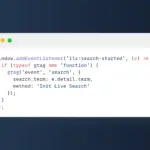
ils:search-started
Fires when the user starts typing a search term.event.detail contains:
{ "term": "your search term" }ils:results-loaded
Fires when search results are successfully rendered in the modal.event.detail is an object like:
{
  "count": 10,
  "append": false,
  "command": {
    "cmd": "recent",
    ...
  }
}
ils:result-clicked
Fires when a user clicks on a result item in the modal.
Note: Does not fire when selecting results via the Enter key.event.detail includes:
{
  "id": 123,
  "url": "https://example.com/post",
  "title": "Post Title",
  "type": "post",
  "category": "news",
  "command": "recent"
}
How to Use
You can register listeners on window or document like so:
window.addEventListener('ils:result-clicked', e => {
  console.log('User clicked on a result:', e.detail);
});
Practical Use Cases
- Trigger
confettior sound effects when results are displayed. - Send tracking data to Google Analytics or custom platforms when a search is made or a result is clicked.
- Automatically scroll to the results area or highlight certain UI components.
- Add custom badges, categorize result types, or inspect result data for further interaction (e.g., WooCommerce-specific handling).
Notes
- Events only fire when the modal is active.
- You can use these events to interact with elements outside of the plugin (e.g., syncing global UI).
- If you want to add new custom events, you can modify the plugin’s JavaScript or submit a pull request.
Conclusion
The ils:* event system in Init Live Search gives developers full control to extend and customize the search experience without touching the plugin’s core code. It reflects the plugin suite’s core philosophy: maximum extensibility by design.





Comments