






Latest Posts

    How to Create a Start Screen for Init Live Search

    A start screen helps users discover engaging content right when they open the Init Live Search modal. This guide shows you how to use built-in REST APIs like /categories, /tags, and /recent to display categories,...

    Search in SEO Metadata: Don’t Miss What Matters Most

    If your default post title is something generic like “How to...”, but the SEO title is “5 Proven Strategies to Boost Conversions with A/B Testing” — which one should show up when users search?

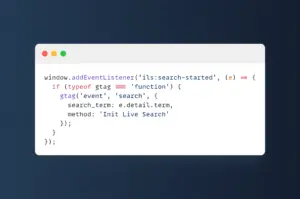
    How to Use JavaScript Events (ils:*) in Init Live Search

    The Init Live Search plugin supports a variety of custom JavaScript events specifically designed for developers. These events allow you to extend functionality, sync UI components, or add custom tracking when users interact with the...

    How to Use Slash Commands in Init Live Search

    Slash commands are a powerful feature in the Init Live Search plugin, allowing users to input special commands by starting with a /. Instead of typing regular keywords, you can use commands like /recent, /tag...

    List of REST API Endpoints in Init Live Search

    The Init Live Search plugin provides a powerful and flexible REST API system designed to support both frontend search UI and headless applications. All endpoints use the namespace /wp-json/initlise/v1/ and are optimized with wp_cache_set() to...

    Guide to Using the /top REST API Endpoint in Init View Count

    The Init View Count plugin provides the /wp-json/initvico/v1/top REST API endpoint to fetch the most viewed posts. This is a powerful tool for frontends, SPAs, mobile apps, or headless WordPress setups. This article provides a...

    Using Shortcodes in Init View Count – Flexible View Display

    The Init View Count plugin provides two powerful shortcodes to display view counts and popular post lists. This article will guide you through using [init_view_count] and [init_view_list], with real-world examples and interface customization tips.

    Using Shortcodes in Init FX Engine

    The Init FX Engine plugin provides two convenient shortcodes for adding visual effects to your content: [init-fx] and [init-fx-ambient]. This guide explains how to use each shortcode with clear examples.

    Web-Based Tools

    Press Ctrl + \ on desktop, or swipe left anywhere on mobile.

    Login